albtechportal

  • Subscribe to our RSS feed.
  • Twitter
  • StumbleUpon
  • Reddit
  • Facebook
  • Digg

Monday, 14 October 2013

10 Most Hated Programming Languages!

Posted on 12:05 by Unknown
Every programmer or software developer has strong opinions about the programming languages. While every programmer has his own preference, one developer’s favourite language can be another's worst. For endless reasons like odd syntax, too much (or too little) flexibility, poor debugging capabilities etc. developers have their own hated language. So here we bring to you a list of the 10 most hated programming languages together with the reasons on why they are avoided.
IT, Programming languages, most hated programming languages, tough programming language, difficult programming language, Python, Visual basic, Perl, Java, PHP, C++, COBOL, Tcl, Javascript, labview,
 
10. Python

What it is: A high level, all purpose programming language that prides itself on its readability. It’s often used as a scripting language, though it can also be compiled.

Biggest complaint: Indentation is used to specify block structures rather than brackets or braces. Also, heavy use of colons and underscores and module/variable name collision.

How To Get Rid: Don’t work at Google, Yahoo or NASA.

9. LabVIEW

What it is: The Laboratory Virtual Instrument Engineering Workbench is actually a development environment for G, a visual, dataflow programming language, used for measurement and control systems. Programmers use LabVIEW to connect functional nodes via “wires” to determine execution.

Biggest complaints: The GUI programming approach can make anything beyond the simplest of tasks extremely complex.

How To Get Rid: Stay away from jobs programming instrument control (particularly lab instrumentation) or industrial automation. Also, avoid helping your kids with LEGO MINDSTORMS projects.

8. JavaScript

What it is: An interpreted language, originally developed by Netscape, used primarily as a client-side scripting language on web pages. It’s also been implemented for server-side web scripting and as an embedded scripting language.

Biggest complaints: Case sensitivity, different implementations across browsers, lack of debugging capabilities (though Firebug solves that) and odd inheritance rules.

How To Get Rid: Don’t work as a web developer.

7. Tcl

What it is: Developed as an embedded command language, the Tool Control Language has evolved into a general purpose scripting language used for things such as web applications, network administration and test automation.

Biggest complaints: The syntax is almost too simple, it lacks pointers so there’s no way to pass by reference, arrays are stored as strings, it has poor list semantics and confusing variable scoping.

How To Get Rid: Don’t work for Cisco, AOL or CNET or anyplace using AOLserver or the OpenACS platform.

6. COBOL

What it is: A language first specified in 1959, designed primarily to support business applications and government administrative functions, COmmon Business-Oriented Language legacy systems are still widely in use.

Biggest complaints: Extremely verbose syntax (it was intended to be readable by non-programmers), incompatibility between versions, and, prior to COBOL 2002, lack of support for object oriented-programming, functions and pointers.

How To Get Rid: Don’t work in government, financial services or for the military.

5. C++

What it is: An intermediate-level language created as an extension of C which supports, among other enhancements, object oriented programming. It remains one of the most popular languages, used in a wide variety of systems and applications.

Biggest complaints: Too big of a feature set, manual memory management, slow compilation speed and the fact that it allows programmers to switch between object oriented and procedural code in the same program.

How To Get Rid: Don’t work for Adobe, Google or the gaming industry, in general.

4. PHP

What it is: An interpreted language most often used for server-side scripting to generate HTML pages dynamically. It can also be used as a stand alone scripting language on many operating systems.

Biggest complaints: Inconsistent naming conventions for its many functions, security holes, no native support for Unicode, plus it often gets mixed in with presentation code (e.g., HTML, CSS).

How To Get Rid: If you do any web-based work it’s hard to avoid, but, for starters, don’t work for Facebook, and stay away from Wikimedia, Wordpress, Joomla and Drupal.

3. Java

What it is: An object-oriented language originally created for interactive television and one of the most popular programming languages in use today. Java code gets compiled into bytecode, which is then interpreted by a platform-specific Java Virtual Machine, meaning Java programs are “Write Once, Run Anywhere.”

Biggest complaints: The syntax is too verbose, it’s slow, it’s not easy to pass functions, the API’s are over-engineered and lots of other languages can do what it does, but more efficiently.

How To Get Rid: Don’t develop any apps using the Android SDK.

2. Perl

What it is: A high level, interpreted, all-purpose language that’s been called a “Swiss Army chainsaw” and the “duct tape of the Internet.” Perl is used for everything from CGI scripting to system and network administration.

Biggest complaints: The main criticism against Perl, consistently, is that there too many ways to do things. So many, in fact, that it’s essentially a write-only language, meaning Perl code becomes impossible to read (and, ultimately, maintain).

How To Get Rid: Don’t become a programmer.

1. Visual Basic

What it is: A programming language and integrated development environment used primarily in the development of Windows applications with graphical user interface. Created by Microsoft and meant to be easy to use for beginners, applications are built using a combination of graphical, drag-and-drop techniques and writing code.

Biggest complaints: Its syntax is considered too verbose and strange, it requires dynamic link libraries to run, it has poor support for objected-oriented programming and the fact that it hasn’t been officially supported by Microsoft since 1998.

How To Get Rid: Avoid working for any company with Windows applications created before 2008.

Source: efytimes
Read More
Posted in Programming | No comments

Here's How You Can Assemble A Computer In Two Minutes

Posted on 12:03 by Unknown
If you have a basic working knowledge of computer hardware and have always wanted to figure out how you could go about assembling a computer, read on, because we are bringing to you a tutorial on how you can connect a computer in under 2 minutes.

Here's all you need to begin with:

Asus Z87-A motherboard - $140
Intel Core i5-4430 Haswell 3.0GHz quad-core processor - $190
G.SKILL Ripjaws X Series 8GB DDR3 SDRAM - $80
Radeon HD 5450 graphics card - $30
Rosewill wireless card - $10
Seagate Barracuda 1TB hard drives (x2) - $70 each
Optical drive - $20
Antec 550W power supply - $65
Corsair 400R mid tower - $100
Asus PB278Q 27-inch LED monitor with speakers - $550
Logitech M705 wireless mouse - $40
Logitech K120 keyboard - $11
Windows 7 Home Premium - $75
Total: $1,451

The first step to building your own PC is the installation on the motherboard. Lay the case on the side to proceed. Importantly, this step might need spacing screws so that the in order to make it level with the cut-outs on the back of the case. Either way the best idea is to ensure that one has secured the motherboard to the case by the use of the supplied screws.
Assembling computer, computer assembling, Computer, PC, Motherboard, CPU, PCI cards

Once this is done, one needs to place the memory into the slots that are recommended in the motherboard's manual. The security step here is to ensure that the memory clicks into place and is secure.

The next step is the addition of the CPU. This is the most critical and also the most delicate part of the computer. The best way to manage the step correctly is to handle it by its sides and then add the processor to the motherboard and secure it using the clamp. Then add some thermal paste. This is important because only once this is done can the heat be transferred from the CPU to the heat sink. Proceed to add add the heat sink and fan. As the final leg of the step, check that the motherboard's manual on where to plug the fan into for power.

Next, add any PCI cards into the corresponding slots. Keeping in mind the need for the components to get power, the next step will be to connect the power supply, which typically goes at the bottom of the case. Finish by tightening the screws to hold it in place. Now connect the power supply to the various components.

The next step is the addition of the hard disk and the optical drive. These ideally should just slide into the bays and either click into place or need to be secured using screws.

These two components require both data and power cables. Power cables will come from the power supply and data from the motherboard. Once you have accomplished this, you will need to connect the monitor, keyboard and mouse. Hit the power button following this. The power button will be found on the on the case. 
Read More
Posted in Hardware | No comments

Wednesday, 9 October 2013

How To Terminate Fiber Optic Cable Using AFL Fast Connectors

Posted on 02:46 by Unknown
This is an introduction to the most commonly installed Fiber Optic Cable – 62.5 Multimode fiber, using AFL Fast SC or LC connectors. This new style 2009 Fast connector has cut the cost of labor and time in the field up to 90% compared to termination styles from 10 years ago.

Items Needed:
AFL Fast Connectors
Fiber Stripper
Fiber Cleaver
Fiber Wipes
Kevlar Scissors

Warning: Always wear protective eyewear when terminating optical fibers. Dispose of cut or cleaved ends properly.

Let’s Get Started:
First, you’ll want to cut the outside jacket off the fiber optic cable, maybe about 18 inches from the end. Electrician snips will be fine with most types of fiber optic cable. You may or may not need to cut the kevlar depending on what style fiber connector your using. Since were using AFL Fast connectors, we’ll cut the kevlar down.

If your using a 250μm buffered fiber, you’ll then slid the boot over the fiber strand, small end first.

Then strip the buffer coating off the individual strands with a fiber optic stripping tool. Be sure to leave more fiber than the finished cleave length. It is recommended that the stripped fiber be cleaned with an alcohol wipe before cleaving to remove any dust or debris.

Check the fiber for integrity by bending the stripped end of the fiber slightly. This insures that you have not damaged it during the stripping step.

Now we need to cut the fiber to length using a cleaver. A cleaver is a specially designed tool that makes a controlled break in the glass. It also cuts it to the exact length you need. The cleave length will vary depending on what size coating of buffer your using. Since were using a 250μmwe need to cleave the connector at 10mm (the cleave length is 10.5mm for ST connectors).


Once we have the fiber cleaved, we need to carefully insert the fiber into the connector. Press the wedge into the connector to open it.


Once it is inside, apply slight force on the fiber into the connector. This will insure the prepared fiber is against the internal pre polished fiber inside the connector.


Maintaining slight force on the fiber, release the wedge unit by squeezing it from the side until the wedge pulls out of the connector body. Slide the locking piece from the bottom of the wedge unit and remove the wedge from the connector assembly. Slide the boot up and engage it over the rear of the connector body. Apply the connector housing onto the assembly from the front.

Your DONE!

Read More
Posted in Cabling, Fiber Optic, IT, Tutorials | No comments

How To Punch Down Cat5e/Cat6 Keystone Jacks

Posted on 02:42 by Unknown
How to punch down a Cat5e/Cat6 keystone jack, step-by-step instructions. I took a bunch of pictures along the way to better explain the process, and to let you see just what it should look like. If you want to see the process of punching down a Cat5e or Cat6 jack on video, scroll to the bottom of this post. To get started, let's take a look at what tools you will need:

Electricians Scissors (regular household scissors will work also)

Wire Stripper (you can use electricians scissors if you don't have any wire strippers)

Punch Down Tool with 110 Blade
 

Punch Down Palm Tool (optional)

Cat5e/Cat6 Keystone Jacks

 Bulk Cat5e/Cat6 Ethernet Cable
 

Now that we have all the tools, let's punch down some keystone jacks.

First, strip off at least 1 inch of jacket on your Cat5e/Cat6 cable. Make sure not to cut into the wires. If you do, you'll need to start over. This picture shows what the two cables look like side by side. The Cat6 cable is larger (bottom) due to the separator between the pairs.

Cut off the ripcord

If you using Cat6 cable, it should have a separator. Cut that off as well. Simply pull the 4 pairs of wire back and cut it off

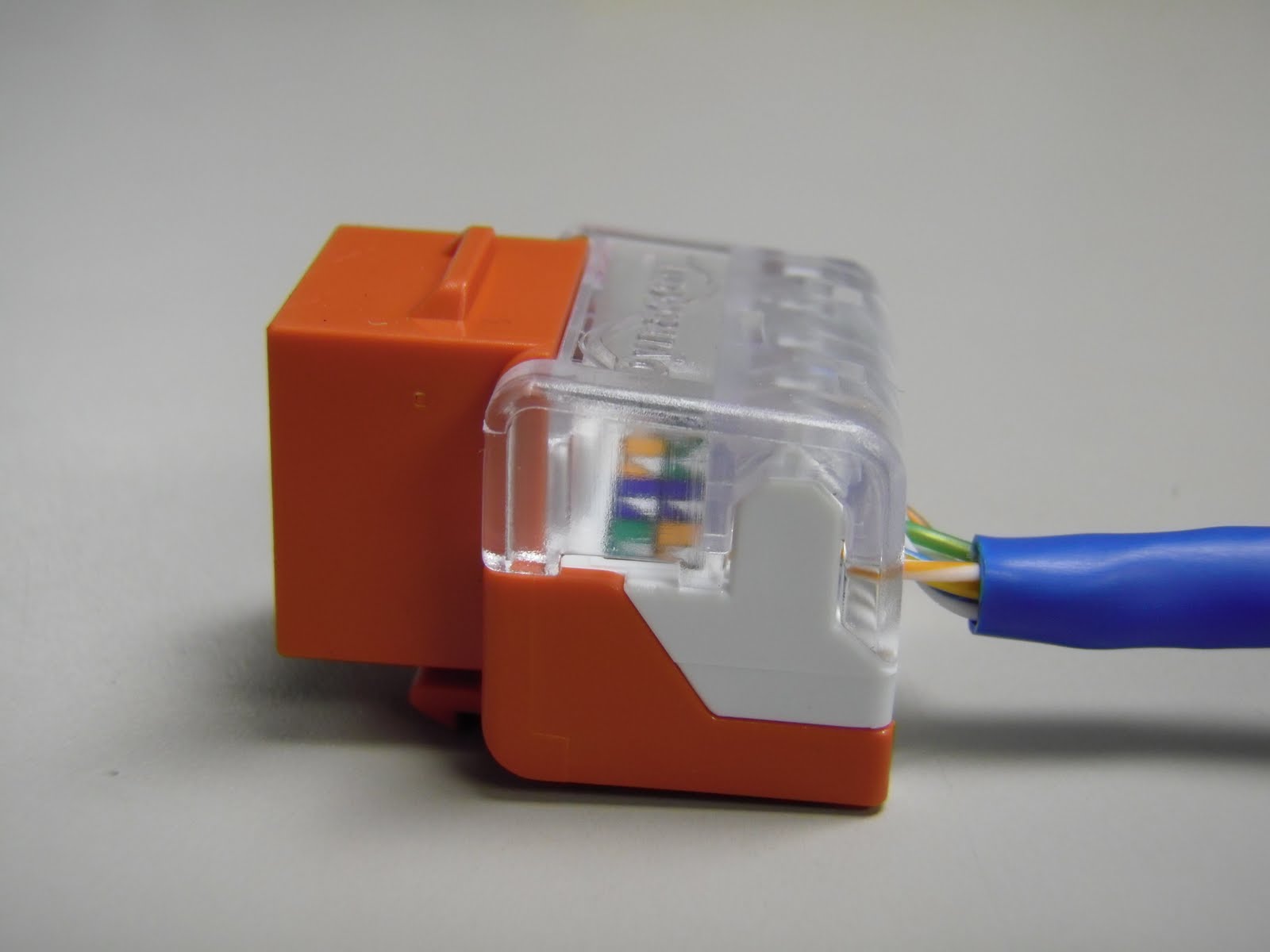
Now were ready to lace up the wires on the keystone jack. This style of jack is very user friendly and great for beginners or professional installers. You can see 110s are in a single row and that they are pointed, making it easier to lace the wires down

Let's go ahead and wire these keystone jacks following the 568b Wiring Diagram

You can see the keystone jack has the color code for 568A and 568B on the jack. They are very similar, but 568B is most commonly used nowadays.
 

Once all the wires are laid down, your keystone jack should look like this. Notice how I left the pairs of wire twisted. I was able to do this because of the pointed ridges on the jack, making it much easier to set the wires in. Many other styles of jacks out there have a flat surface, requiring you to untwist all 4 pairs of wire down to the jacket. Also notice how the jacket of the cable is right up against the keystone jack. You don't want any more than 1/2" of the wires exposed.

Once you have the wires laced in correctly, set your keystone jack in a jack palm tool. If you don't have one of these available, you can punch the jack down on the ground or a desk, but I suggest putting a piece of cardboard down to prevent the jack from slipping out when you punch them down. I would strongly suggest AGAINST using your hand to punch down jacks without the use of this tool. The jack can slip out and the tool will cut right through your hand. Not a pretty site

Now, take your punch tool and find the side that says "CUT". You want to make sure the tool faces the correct way, or you'll cut the wrong side of the wires off. This is how your tool should look when punching down the jack. Notice the pointy tip on the left side of the 110s

 A close up view of the 110 blade shows this better

Once the punch down tool is positioned correctly, push down firmly until you feel it pop. You should see the wire cut off. If it doesn't, you may need to do it once more. Here you can see I terminated the brown pair

Repeat with the other 3 pairs of wires and you have a completed keystone jack. It will look like this. Note how the jacket is very close to the jack. You want to make sure you keep it as close as possible.

Here is a picture or the WRONG way. The cable jacket is stripped too far back, exposing more than 1/2" of the wires


Lastly, press the clear dust cover on your jack and your DONE

Now let's watch it on video
Read More
Posted in Cabling, IT, Tutorials | No comments

Cat6A cable and connectors comparison and overiew

Posted on 02:37 by Unknown
Over the past couple of years I've been getting more calls and inquires regarding Cat6A copper networking. I agree that Cat6A is cool but let's dig a bit more into the cable and connectivity before we talk about who's mostly installing it.

The Cat6A standard is performing 10 Gigabit Ethernet (10GBASE-T) up to 500MHZ and at a maximum distance of 328ft. Cat6A is also backward compatible with Cat6 and Cat5e performance applications. (Don't forget that Cat6 will do 10G up to 180 feet).

Here's a quick look at Cat6A vs. Cat6

When comparing Cat6A cables from one brand to the other I'm always comfortable with the standard 500MHZ rating. You might find Cat6A cables with a higher MHZ rating, typically those cables are more interested in appearing as a "faster speed" cable. This is a common selling point by low end quality cable manufactures trying to appear as a faster cable for less cost and I've also seen it with high end cable manufactures trying to get the consumer to pay more for the same product.

If you do see a higher MHZ rating keep in mind there is no standard for a higher MHZ rated Cat6A cable. The standard for for Cat6A is defined by TIA (Telecommunications Industry Association) as 568-C.2 replacing 568-B.2-10 and it defines this standard as a performance requirement for Cat6A channels, permanent links and components at 500MHZ. The ISO (International Standards Organization) has it listed as 11801 Class EA, the equivalent standard outside North America.

500MHZ is the standard, so if you do find a different MHZ rating you're paying for something that has no defined standard so your paying more for less. I've had to go over the MHZ rating for years on Cat5e big E and little E all thanks to manufactures confusing the market. Stop please!

There will also be some other things to think about, like how Cat6A cable is sold on reels. You'll need some reel handling equipment. If your going to pull this cable once ever, you can make a reel stand with a couple of ladders and a pole. I know it's not pretty but I've seen it many times on job sites.

The weight of this cable is also an issue with shipping cost, going through UPS can be expensive. Moving these cables around at your installation can be also be a chore due to the weight. Bend with the knees.
 
The diameter of the cable could also present a problem. The above video shows a first generation Cat6A cable and that cable typically has a outside diameter of .330" and Cat6 has a typical outside diameter of .230" and there is a very noticeable difference. A second generation Cat6A cable has been out for a little while now and has a outside diameter of .300" and that has helped ease the installation process and saving cost on certain types of materials such as conduits, horizontal, vertical cable management, J-hooks and cable runways.

You also need to think about the bend radius. To maintain Cat6A performance the minumum bend radius should be 4x the outside diameter for UTP and shielded. This radius is larger than Cat6 and Cat5e. The cable pulling tension must not exceed 25 pounds of force. Don't forget threaded rods, stronger anchors are also needed to support the heavier cable. 

You'll also find that on the connectivity side of things it could get very expensive. Here's a look at possibly the top line of Cat6A insert jacks by Commscope, an overview of the jack then how to terminate.
As you can tell the Commscope Systimax jack is awesome but can cost up to $17 each but then again it is a top dog and the test results prove it.

Another quality insert jack to maybe consider is by Signamax. Here's an overview on it and how to terminate it.

The Signamax jack can run up to $7 each, better priced than the Commscope brand but still a noticeable higher difference in cost compared to their Cat6 and Cat5e offering.

Another common question I get asked about is what about shielded? I think shielded jacks and cable are not necessary for most applications. I've commonly sold shielded products for Television and Radio station installations, for a home or even your common commercial installation I think is overkill. Alright, we can check out a shielded jack anyways.
 
So we have jacks and cable, let's talk about patch panels. Most of the patch panels I've seen from brand to brand seem to not have a noticeable difference. Still using a 110 blade for punching down and still taking up the same amount of rackspace for the ports. You know, 24 port is 1U 48 port is 2U and so on.

So we've talked about cable, jacks, patch panels but what about patch cords? So far I've been moving 26awg patch cords and they are stranded for flexibility.
 
The patch cables in the above video shows that it does in fact have a small outside diameter of around 0.24 and that goes a long way when patching panels to routers. Patch cord pricing is not all that bad compared to a quality American made Cat6 or Cat5e patch cable. Cable manufactures seem to only be offering bulk Cat6A stranded cable for assemblies in a shielded version. I understand, it's cheaper to carry just a shielded cable then both.  

The Cat6A market is still very fresh and trying to gain traction. It might be growing slowly into the market over the past few years due to the economy or due to the emergence of fiber optic cable for 10G applications.

Here's an example of a 10G fiber optic cable

Many new switches from Cisco and Hewlett Packard have a 10G option when used with the appropriate SFP modules and with fiber pushing 10G much further than copper, fiber optics have been much more popular in campus environments. Data centers do seem to be the one area that is using a good mix of 10G fiber and copper.

I understand everyone wants the latest and greatest but I'm not sure if Cat6A will successfully escape the data center. Maybe it'll just stay there and die.

Source :discountlowvoltage
Read More
Posted in Cabling, Tutorials | No comments

Monday, 7 October 2013

Windows Server 2012

Posted on 07:53 by Unknown
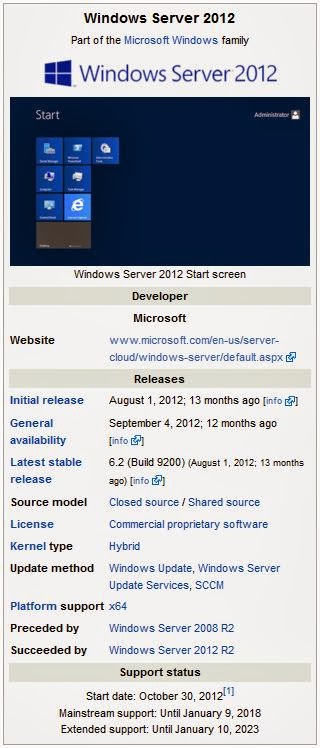
Windows Server 2012, codenamed "Windows Server 8",[2] is the sixth release of Windows Server. It is the server version of Windows 8 and succeeds Windows Server 2008 R2. Two pre-release versions, a developer preview and a beta version, were released during development. The software was generally available to customers starting on September 4, 2012.[3]
Unlike its predecessor, Windows Server 2012 has no support for Itanium-based computers,[4] and has four editions. Various features were added or improved over Windows Server 2008 R2 (with many placing an emphasis on cloud computing), such as an updated version of Hyper-V, an IP address management role, a new version of Windows Task Manager, and ReFS, a new file system. Windows Server 2012 received generally good reviews in spite of having included the same controversial Metro-based user interface seen in Windows 8.

History

Windows Server 2012, codenamed "Windows Server 8",[2] is the sixth release of Windows Server family of operating systems developed concurrently with Windows 8.[5][6] It was not until 17 April 2012 that the company announced that the final product name would be "Windows Server 2012".[2]
Microsoft introduced Windows Server 2012 and its developer preview in the BUILD 2011 conference on 9 September 2011.[7] However, unlike Windows 8, the developer preview of Windows Server 2012 was only made available to MSDN subscribers.[8] It included a graphical user interface (GUI) based on Metro design language and a new Server Manager, a graphical application used for server management.[9] On 16 February 2012, Microsoft released an update for developer preview build that extended its expiry date from 8 April 2012 to 15 January 2013.[10]
Before Windows Server 2012 was finalized, two test builds were made public. A public beta version of Windows Server 2012 was released along with the Windows 8 Consumer Preview on 29 February 2012.[5] The release candidate of Windows Server 2012 was released on 31 May 2012, along with the Windows 8 Release Preview.[6]
The product was released to manufacturing on 1 August 2012 and became generally available on 4 September 2012.[3] However, not all editions of Windows Server 2012 were released at the same time. Windows Server 2012 Essentials was released to manufacturing on 9 October 2012[11] and was made generally available on 1 November 2012.[12] As of 23 September 2012, all students subscribed to DreamSpark program can download Windows Server 2012 Standard or Datacenter free of charge.[13]

Features

Installation options

Unlike its predecessor, Windows Server 2012 can switch between "Server Core" and "Server with a GUI" installation options without a full reinstallation. Server Core - an option with a command-line interface only - is now the recommended configuration. There is also a third installation option that allows some GUI elements such as MMC and Server Manager to run, but without the normal desktop, shell or default programs like File Explorer.[9]

User interface

Server Manager has been redesigned with an emphasis on easing management of multiple servers.[14] The operating system, like Windows 8, uses the Metro UI unless installed in Server Core mode.[15] Windows PowerShell in this version has over 2300 commandlets, compared to around 200 in Windows Server 2008 R2.[16]

Task Manager

Main article: Windows Task Manager
Windows Server 2012 includes a new version of Windows Task Manager together with the old version.[17] In the new version the tabs are hidden by default showing applications only. In the new Processes tab, the processes are displayed in varying shades of yellow, with darker shades representing heavier resource use.[18] It lists application names and status, as well as CPU, memory, hard disk and network utilization. The process information found in the older versions are now moved to the new Details tab. The Performance tab shows "CPU", "Memory", "Disk", "Wi-Fi" and "Ethernet" graphs. The CPU tab no longer displays individual graphs for every logical processor on the system by default; instead, it can display data for each NUMA node. When displaying data for each logical processor for machines with more than 64 logical processors, the CPU tab now displays simple utilization percentages on heat-mapping tiles.[19] The color used for these heat maps is blue, with darker shades again indicating heavier utilization. Hovering the cursor over any logical processor's data now shows the NUMA node of that processor and its ID, if applicable. Additionally, a new Startup tab has been added that lists startup applications,[20] however this tab does not exist in Windows Server 2012.[21] The new task manager recognizes when a Windows Store app has the "Suspended" status.

IP address management (IPAM)

Windows Server 2012 has an IP address management role for discovering, monitoring, auditing, and managing the IP address space used on a corporate network. The IPAM is used for the management and monitoring of Domain Name System (DNS) and Dynamic Host Configuration Protocol (DHCP) servers. Both IPv4 and IPv6 are fully supported.[22]

Active Directory

Windows Server 2012 has a number of changes to Active Directory from the version shipped with Windows Server 2008 R2. The Active Directory Domain Services installation wizard has been replaced by a new section in Server Manager, and a GUI has been added to the Active Directory Recycle Bin.[23] Multiple password policies can be set in the same domain.[24] Active Directory in Windows Server 2012 is now aware of any changes resulting from virtualization, and virtualized domain controllers can be safely cloned. Upgrades of the domain functional level to Windows Server 2012 are simplified; it can be performed entirely in Server Manager. Active Directory Federation Services is no longer required to be downloaded when installed as a role, and claims which can be used by the Active Directory Federation Services have been introduced into the Kerberos token. Windows Powershell commands used by Active Directory Administrative Center can be viewed in a "Powershell History Viewer".[25][26]

Hyper-V

Windows Server 2012, along with Windows 8, includes a new version of Hyper-V,[27] as presented at the Microsoft BUILD event.[28] Many new features have been added to Hyper-V, including network virtualization, multi-tenancy, storage resource pools, cross-premise connectivity, and cloud backup. Additionally, many of the former restrictions on resource consumption have been greatly lifted. Each virtual machine in this version of Hyper-V can access up to 64 virtual processors, up to 1 terabyte of memory, and up to 64 terabytes of virtual disk space per virtual hard disk (using a new .vhdx format).[29][30] Up to 1024 virtual machines can be active per host, and up to 8000 can be active per failover cluster.[31] SLAT is a required processor feature for Hyper-V on Windows 8, while for Windows Server 2012 it is only required for the supplementary RemoteFX role.[32]

ReFS

Main article: ReFS
Resilient File System (ReFS),[33] codenamed "Protogon",[34] is a new file system in Windows Server 2012 initially intended for file servers that improves on NTFS in some respects. Major new features of ReFS include:[35][36]
Improved reliability for on-disk structures
ReFS uses B+ trees[35] for all on-disk structures including metadata and file data. Metadata and file data are organized into tables similar to a relational database. The file size, number of files in a folder, total volume size and number of folders in a volume are limited by 64-bit numbers; as a result ReFS supports a maximum file size of 16 Exabytes, a maximum of 18.4 × 10¹⁸ folders and a maximum volume size of 1 Yottabyte (with 64 KB clusters) which allows large scalability with no practical limits on file and folder size (hardware restrictions still apply). Free space is counted by a hierarchical allocator which includes three separate tables for large, medium, and small chunks. File names and file paths are each limited to a 32 KB Unicode text string.
Built-in resilience
ReFS employs an allocation-on-write update strategy for metadata,[35] which allocates new chunks for every update transaction and uses large IO batches. All ReFS metadata has built-in 64-bit checksums which are stored independently. The file data can have an optional checksum in a separate "integrity stream", in which case the file update strategy also implements allocation-on-write; this is controlled by a new "integrity" attribute applicable to both files and directories. If nevertheless file data or metadata becomes corrupt, the file can be deleted without taking down the whole volume offline for maintenance, then restored from the backup. As a result of built-in resiliency, administrators do not need to periodically run error-checking tools such as CHKDSK when using ReFS.
Compatibility with existing APIs and technologies
ReFS does not require new system APIs and most file system filters continue to work with ReFS volumes.[35] ReFS supports many existing Windows and NTFS features such as BitLocker encryption, Access Control Lists, USN Journal, change notifications,[37] symbolic links, junction points, mount points, reparse points, volume snapshots, file IDs, and oplock. ReFS seamlessly[35] integrates with Storage Spaces, a storage virtualization layer that allows data mirroring and striping, as well as sharing storage pools between machines.[38] ReFS resiliency features enhance the mirroring feature provided by Storage Spaces and can detect whether any mirrored copies of files become corrupt using background data scrubbing process, which periodically reads all mirror copies and verifies their checksums then replaces bad copies with good ones.
Some NTFS features are not supported in ReFS, including named streams, object IDs, short names, file compression, file level encryption (EFS), user data transactions, hard links, extended attributes, and disk quotas.[35][34] Sparse files was not supported by Preview, but it is supported by RTM.[39][40] ReFS does not itself offer data deduplication.[35] Dynamic disks with mirrored or striped volumes are replaced with mirrored or striped storage pools provided by Storage Spaces. However, in Windows Server 2012, automated error-correction is only supported on mirrored spaces, and booting from ReFS is not supported either.

IIS 8.0

Windows Server 2012 includes version 8.0 of Internet Information Services (IIS). The new version contains new features such as SNI, CPU usage caps for particular websites,[41] centralized management of SSL certificates, WebSocket support and improved support for NUMA, but few other substantial changes were made.[42]

Scalability

Windows Server 2012 supports the following maximum hardware specifications.[43][30] Windows Server 2012 improves over its predecessor Windows Server 2008 R2:


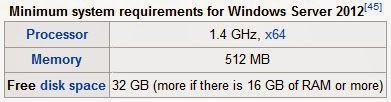
System requirements


Windows Server 2012 runs only on x64 processors. Unlike its predecessor, Windows Server 2012 does not support Itanium.[4]Upgrades from Windows Server 2008 and Windows Server 2008 R2 are supported, though upgrades from prior releases are not.[45]

Editions

Windows Server 2012 has four editions: Foundation, Essentials, Standard and Datacenter.


Reception

Reviews of Windows Server 2012 have been generally positive.[51][52][53] Simon Bisson of ZDnet described it as "ready for the datacentre, today,"[51] while Tim Anderson of The Register said that "The move towards greater modularity, stronger automation and improved virtualisation makes perfect sense in a world of public and private clouds" but remarked that "That said, the capability of Windows to deliver obscure and time-consuming errors is unchanged" and concluded that "Nevertheless, this is a strong upgrade overall."[52] InfoWorld noted that Windows Server 2012 has the Metro UI, which had led to mixed reviews for Windows 8, but mentioned that "Microsoft is pushing harder for a GUI-less install than a Metro-based screen", with reference to the improved Server Core installation option and the improvements for Windows PowerShell.[54] However, Michael Otey of Windows IT Pro expressed dislike with the new Metro interface and the lack of ability to use the older desktop interface alone, saying that most users of Windows Server manage their servers using the graphical user interface rather than PowerShell.[55] The Australian construction company Kennards found the OS stable.[56]
Paul Ferrill wrote that "Windows Server 2012 Essentials provides all the pieces necessary to provide centralized file storage, client backups, and remote access,"[57] but Tim Anderson contended that "Many businesses that are using SBS2011 and earlier will want to stick with what they have", citing the absence of Exchange, the lack of ability to synchronize with Active Directory Federation Services and the 25-user limit,[58] while Paul Thurott wrote "you should choose Foundation only if you have at least some in-company IT staff and/or are comfortable outsourcing management to a Microsoft partner or solution provider" and "Essentials is, in my mind, ideal for any modern startup of just a few people."[59]

Windows Server 2012 R2

Windows Server 2012 R2 is the next version of Windows Server. It was unveiled on June 3, 2013 at TechEd North America,[60] with a preview release on June 24, 2013.[61] According to Windows Server 2012 R2 datasheet published on May 31, 2013, there will be three editions of this operating system: Essentials, Standard and Datacenter.[62]As with Windows Server 2012, the Datacenter and Standard editions are feature identical, varying only based on licensing (particularly licensing of Hyper-V VMs). The Essentials edition has the same features as the Datacenter and Standard products, with some restrictions.[63]

Changes from Windows Server 2012

Microsoft has confirmed the following changes introduced by Windows Server 2012 R2:
  • Automated Tiering: Storage Spaces stores most frequently accessed files on fastest physical media[64]
  • Deduplication for VHD: Reduces the storage space for VHD files with largely similar contents by storing the similar contents only once[64]
  • Windows PowerShell v4, which now includes a Desired State Configuration (DSC) feature
  • Integrated Office 365 support
  • Return of the Windows Start button[65]
  • UEFI-based virtual machines
  • Upgrades from driver emulators to synthetic hardware drivers to minimize legacy support
  • Boot from SCSI
  • Faster VM deployment (approximately half the time)[66]
  • IIS 8.5, which includes several performance and logging enhancements[66]                       
  •  
    Source : Wikipedia.org
Read More
Posted in Microsoft, Server2012 | No comments
Newer Posts Older Posts Home
Subscribe to: Posts (Atom)

Popular Posts

  • Call of Duty: Ghosts Review
    Developer: Infinity Ward Publisher: Activision Platforms: PC, X360, PS3, PS4, Xbox One Price: £39.99 Reviewing a Call of Duty game is a ...
  • ‘Strata’ for iOS and Android game review
    There are games that are fun. There are games that look great. And then there are games that do both. Strata is one such game that h...
  • Review: Seagate 600 480GB SSD
    Seagate Joins the Fray It’s been quite an interesting turn of events over the past couple years in the storage industry. Whereas practical...
  • Xbox One vs. PS4: How They Stack Up Today
    Two new gaming consoles. Both very powerful. Both very ambitious. Both about to meet head to head... and do battle for your time, money an...
  • iBuypower Chimera 4SE FX Ultimate: AMD Gaming PC
    iBuypower is offering an AMD-based system in its Chimera 4SE line, which is designed to give users serious gaming performance without a wa...
  • The Last Days of the DSLR
    The DLSR is everywhere. You see it around the necks of tourists, against the faces of pro photographers. Since Canon introduced the Digita...
  • Buying Guide: Find the best headphones
    If you’re looking to get more audio enjoyment from your smartphone, tablet, media player, or computer, new headphones will do wonders. And ...
  • CCBoot - LAN Boot Software for Windows
    LAN Boot Solution Background LAN boot is a technology based on IP (Internet Protocol), UDP (User Datagram Protocol), DHCP (Dynamic ...
  • Adobe Photoshop CS6 Extended 13.0 & Plugins + Textures
    Adobe Photoshop CS6 Extended 13.0 & Plugins + Textures | 3.5 GB Adobe Photoshop CS6 Extended software delivers even more imaging magi...
  • Sony Vaio Tap 11 Review
    Introduction Sony's engineering chops are really showing this year, across its phones, tablets and convertibles portfolio. The Vaio Tap ...

Categories

  • Android
  • Apple
  • Audio
  • Blogger
  • C/C++
  • Cabling
  • Cameras
  • Cases
  • CISCO
  • Cooling
  • CPU
  • Desktop
  • DNS
  • Ebook
  • Fiber Optic
  • Gadgets
  • Game
  • Google
  • Graphic Card
  • Hardware
  • HDD
  • HTC
  • HTMLCSS
  • Hyper-V
  • Intel
  • iOS
  • iPad
  • Iphone
  • IT
  • jQuery
  • Laptop
  • Linux
  • Mac
  • MacTut
  • Microsoft
  • Mobile
  • Mouse
  • Networking
  • News
  • Nexus
  • Nokia
  • Nvidia
  • OS
  • PERIPHERALS & COMPONENTS
  • Photoshop
  • Printers
  • Programming
  • Projectors
  • PS4
  • Ram
  • RedHat
  • Review
  • Samsung
  • Scanners
  • Seagate
  • Security
  • Server2008
  • Server2012
  • Servers
  • Smartphone
  • Software
  • Sony
  • Storage
  • Tablets
  • TechNews
  • Template
  • Tutorials
  • TV
  • Ubuntu
  • Voip
  • Webdesign
  • Webiste
  • WebServer
  • Win7
  • Win8
  • Windows Phone
  • Wordpress
  • Workstation
  • XBOX

Blog Archive

  • ▼  2013 (495)
    • ▼  December (35)
      • Smart Power Strip now works with SmartThings WiFi ...
      • The Last Days of the DSLR
      • Nokia Lumia 2520 has arrived, check out our hands-on
      • 2 Million Gmail, Facebook and Twitter Accounts Rep...
      • Fleksy predictive keyboard for Android exits beta,...
      • iPhone Anamorphic Lens Lets You Shoot Wider Than W...
      • Nokia Wins Ban on HTC One Mini in U.K.
      • Finally, USB 3.1 Will Feature Reversible Connectors
      • MSI Launches Small But Mighty Z87I Gaming AC and G...
      • Samsung Galaxy S5 benchmark reveals 2K screen
      • NVIDIA Fan in Bejing Builds a 6ft Replica GeForce ...
      • Are dual-booting phones the future of Android?
      • How to Block Websites in Windows 7/8 in Chrome and...
      • How to Control your Android Mobile from PC or Laptop
      • Resize Image without loosing Quality
      • AllCast for Android pushes media to Apple TV and R...
      • Alcatel Idol X+ to launch with smartwatch and smar...
      • The legend of the HTC HD2 continues; aged device r...
      • Amazon Prime Air drones revealed on 60 Minutes, ai...
      • Samsung to create 20 MP camera sensor for future f...
      • Oppo's swiveling N1 smartphone to be available wor...
      • FileMaker Pro 13 Prematurely Appears on Apple's On...
      • Sony Vaio Tap 11 Review
      • Dell preparing to squeeze 4K resolution onto a 24-...
      • Microsoft releases VideoLoops: A GIF creator tool ...
      • Pebble Smartwatch for Android and iOS Hit Amazon f...
      • 3D Printing Market Forecasted For Explosive Growth...
      • ASUS Transformer Book T100 review: a Windows table...
      • Xbox One's 500GB HDD swapped for bigger, faster dr...
      • U.S. Army Saved $130 Million by Stealing Software
      • Xbox One Scores Big on Black Friday Surpassing PS4...
      • Buying Guide: Find the best headphones
      • Sailfish OS will be available for Android users to...
      • Amazon Cyber Monday Is The Real Deal
      • Nvidia Calls PC "Far Superior" to Video Game Consoles
    • ►  November (332)
    • ►  October (12)
    • ►  September (27)
    • ►  August (2)
    • ►  July (10)
    • ►  June (42)
    • ►  May (35)
Powered by Blogger.

About Me

Unknown
View my complete profile