albtechportal

  • Subscribe to our RSS feed.
  • Twitter
  • StumbleUpon
  • Reddit
  • Facebook
  • Digg
Showing posts with label Laptop. Show all posts

Monday, 2 December 2013

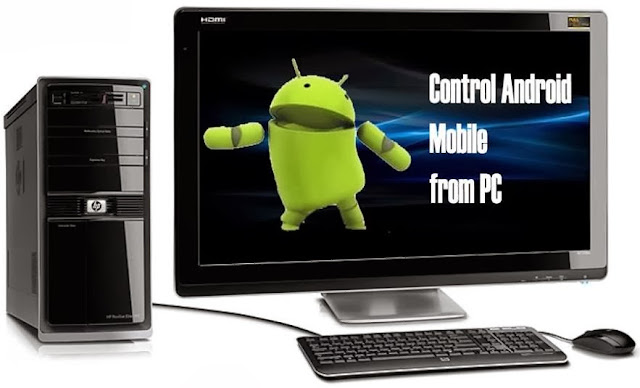
How to Control your Android Mobile from PC or Laptop

Posted on 03:30 by Unknown
control+android+mobile+from+pc
To Control  Mobile from PC there are many apps available, but not all apps are best here we listed best app to make your work easier.

1.Airdroid for Android:

This is best Android app to transfer files from PC to Mobile for free.If you are ever tried sharing apps and file using Bluetooth and USB cable.

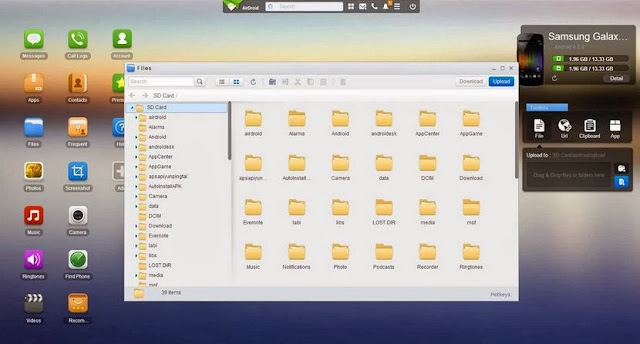
airdroid
Must Check: Control PC with your Mobile
Advantages and Features:
  • Send and Receive SMS from PC.You can also directly talk from PC.
  • Transfer files,apps,photos,videos from PC to mobile wireless
  • Install/Uninstall apps easily and flexibility to take complete back up of your device.
  • Trace your device when you lost it and much more..!!
Must Check: Download S4 and Kitakt 4.4 launcher on your Mobile

Step by Step Process to use Airdroid:

  • Download Airdroid on your device.
  • Now Install and Open app then Click on Start icon.
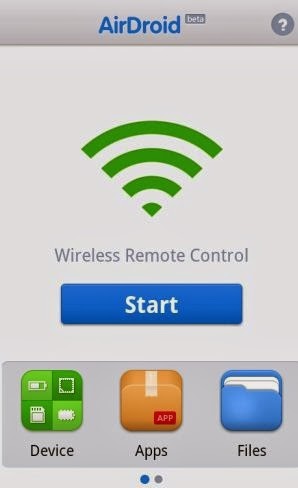
install+airdroid
  • Now note down the web address after clicking start icon.
copy+webaddress
  • Now from PC browser go to web.airdroid.com or in Enter the Web address you copied in previous step.
Note: Make Sure that your device and PC is connected to same Network
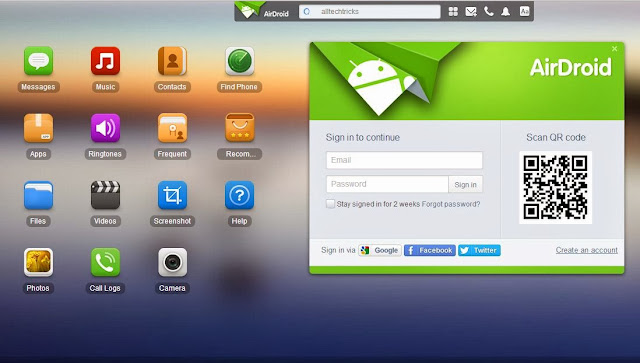
open+in+pc
  • If you are going for web.android.com then you need to verify your device by scanning QR code or by entering password.
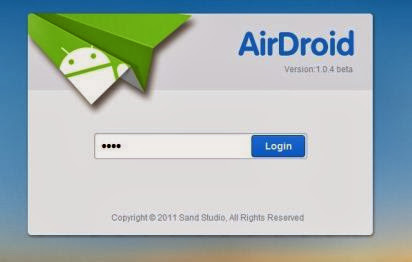
enter+password
  • Now you have successfully connected your android device to PC.You can start upload files by clicking files logo on desktop,you can chat from your PC and can have full access to your android phone or Tablet.
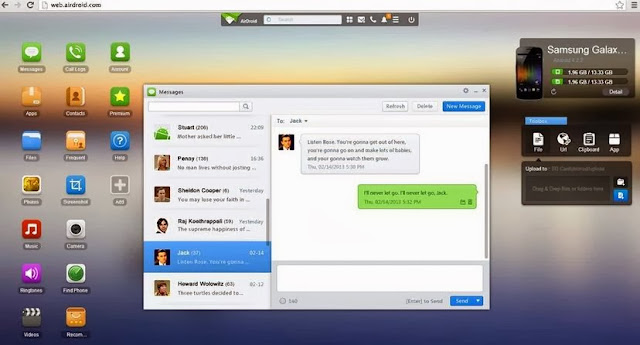
whatsapp+conversation+from+pcupload+and+delete+files
  • That's it Guys ! there are many features avalible once go through all of them and enjoy.

Here is Quick Video


Source
Read More
Posted in Android, Laptop, Mobile, Tutorials | No comments

Tuesday, 26 November 2013

Acer Unleashes Affordable, Touchscreen Chromebook

Posted on 13:52 by Unknown
With technology, it's expected that as time passes, our products will become ever more robust, but there's also a chance that they will become more robust and cost less. A perfect example of this is with Acer's just-announced C720P touchscreen Chromebook, a product that would have been impossible to release just a couple of years ago without a much higher price tag.
On the Chromebook side, Acer's C720 series has been well-received overall, especially on the value front. The C720P, then, hasn't been changed too much so as to mess up the formula. Under the hood is an Intel Haswell-based Celeron 2955U (a dual-core clocked at 1.4GHz), a 32GB solid-state drive (allowing a boot-up time of just 7 seconds), 2GB of RAM, 802.11 a/b/g/n Wi-Fi, and of course, the touchscreen display, which sticks to the 11.6-inch form factor and features a 1366x768 resolution.
Per Acer: "The Acer C720 Chromebook line has been praised for its performance and battery life, and this new touchscreen model allows us to address the needs of an even wider range of customers with exciting new capabilities. We’re certain many holiday shoppers will jump at the chance to get a touchscreen Chromebook for just $299.99."
It's hard to disagree there. Given the notebook's specs, and the fact that it has a touchscreen, $300 sounds like a good deal for those who are looking to pick up a Chromebook. As someone who demands a touchscreen on any future notebook (a stark contrast to my opinion before using one), I wouldn't hesitate to pick up this notebook for when my work needs are a bit lighter. The projected 7.5 hour battery-life sure adds to that pull. A great-looking release overall.
Via: HotHardware | News Archive |
Read More
Posted in Laptop, TechNews | No comments

Saturday, 23 November 2013

Best Chromebook: Find out which Chromebook offers the best performance and battery life

Posted on 11:27 by Unknown
Chrome OS and Chromebooks are a perhaps the thinnest main-stream consumer client you can get today. Hell, next to Chrome OS, Android, IOS and even Windows RT, look positively fat with their full service OS functionality. No, make no mistake about it, Chrome OS is pretty much a browser in a box.  pixel chromebookAnd even though most “real” laptop users will look down their nose at Chromebooks, these low-cost devices have consistently ranked on the top seller lists. In fact, we checked the Amazon top seller list for “laptops” and Chromebooks currently hold the top four out of five spots. Yes, we kid you not. So no matter what we think, it appears that Chromebooks are here to stay.
Since I’ve been a Chromebook user since the original Google CR-48, and have used almost every Chromebook ever made, I decided to see how the modern Chromebooks actually stacked up in performance.
Testing Chromebooks isn’t exactly easy though. Unlike Windows, Android or iOS, most of your “apps” are confined to the browser environment so stand-alone tests aren’t available today. Another problem I’ve come to realize with Chromebooks is that as Google pushes out newer versions of Chrome, the performance can be quite variable. Fortunately, we have in hand the new HP Chromebook 11, Acer’s new C720 as well as Google’s gorgeous Pixel, CR-48. We also fortunately still happen to have the Acer C710 to make this performance roundup. This let us update each of the available Chromebooks to their latest browser/webkit/V8 versions before running tests. One thing to note: only the HP Chromebook 11 and Acer C720 are running Chrome browser 30.0.1599.101 here. Google hadn’t pushed out the latest stable builds of the Chrome OS to its older Chromebooks at press time. Older Chromebook users shouldn’t fret too much though. It’s not like an Android handset that is exiled to an old OS. Our experience says Google does eventually update all of the Chromebooks to the latest COS because even the original CR-48 is just one version back now. One issue we have seen though with Google pushing out updates at seemingly random times: They can greatly impact performance by as much as 10 to 15 percent—in both directions depending on the benchmark. That means any meaningful benchmark has to be done basically in one shot and hopefully before Google pushes out a new update.
Chromebooks are also fairly unique from the Windows world. Generally with Windows laptops, old models are flushed out to make room for new units so they rarely overlap. With this roundup, we get to see the impact of various microarchitectures from Haswell to Sandy Bridge and Ivy Bridge as well as ARM since two of the Chromebooks here run Samsung Exynos 5 parts at 1.7GHz. We’ve noticed that Chromebooks is a sector where OEMs don’t seem to mind selling old units alongside newer units too.
For a sanity check, we also included the original Microsoft Surface Pro hybrid device. It features a 1.7-2.4GHz Core i5-3317U on the Ivy Bridge microarchitecture. Why no Surface Pro 2? We weren’t able to get our hands on one or we would have compared it to these Chromebooks as well. Rather than induce even more variability into it, we used the latest version the Chrome browser on the Surface Pro rather than Internet Explorer.
intel specs
Intel Specs (click here for the complete side-by-side specs)
We let Intel do our work for us so you could eyeball the major x86 contenders in this Chrome-book-off. The Atom N455 is in the original CR-48, the Celeron 847 powers the Acer C710, the Celeron 2955U is in the Acer C720, and the Core i5-3337U runs the Google Pixel. Oh, the last chip, the Core i5-3317U is inside the Microsoft Surface Pro. Amazingly, the Acer C720 pulls off its performance win with a chip that has no Turbo Boost.
amazon best selling notebooks
Best-sellling Amazon laptops (click the image for the full list)
We are not frakking with you—Chromebooks hold four of the top five spots on Amazon’s best seller list according to this screen cap we took Oct. 28.
cr48right.jpg
Google CR-48:Google’s original CR-48 prototype came out December of 2010 and ran a single core Intel 1.66GHz Atom part. The CR-48 never sold but Google gave away 60,000 of the devices. The original OS didn’t even feature a desktop. The CR-48 is way off the mark in performance today but in a testament to how thin ChromeOS is, it is usable for light duty browsing chores. Google still issues updates for the CR-48 as well. 

samsung_chromebook_frontview2_webres.jpg
Samsung Chromebook: With Samsung’s third Chromebook (the company offered a Celeron-based Chomebook) the company offered the first ARM-based Chromebook using the 1.7GHz Exynos 5 chip last October. The unit was light weight, thin and low cost. It also likely ticked off Intel too because if there’s one thing Intel doesn’t like, it’s ARM.
acer_ac710_photo_straight_on.jpg
Acer C7 710: Acer also had been playing in the Chromebook arena and followed up its Atom-based AC700 with the Celeron 847-based C7 C710 in November of 2012. The Celeron offered slightly better performance than the ARM-based Samsung but its keyboard was criticized and its battery life just average.  
pixel_front_white.png
Google Pixel Chromebook: With most Chromebooks under $300 (although the original Series 5 Samsung pushed $450) Google decided to get fancy with its Pixel. The $1,300 to $1,500 Pixel featured a Core i5, aluminum exterior and a gorgeous 2560x1700, touch-enabled IPS panel. The notebook also has perhaps one of the best track pads available today too. Sales figures of the Pixel haven’t been disclosed but when you’re Google—who cares?
pixel_back_angle_white.png
Google Pixel Chromebook:The Pixel’s aluminum shell is exquisite and frankly makes all aluminum notebook competitors seem chincy by comparison. The only real mar to the ultra-luxury feel of the Pixel? The power cord still uses a simple round plug. Boo.
6_hp_chromebook_11_front_white.png
HP Chromebook 11: This is actually HP’s second Chromebook. Earlier this year the company introduced a Celeron 847 Chromebook Pavilion for $330. The new Chromebook 11 though features the same 1.7GHz Exynos 5 as the Samsung ARM Chromebook released last year. One key difference: It’s screen is a beautiful IPS panel and it has a 1990s-esque Macbook look too. HP also has a 14-inch version using a Haswell Celeron. Oh, it also charges via Micro-USB too.
acer_c720_chromebook_01_wp-acer-03.jpg
Acer C720: We always thought Haswell would take on ARM in tablets but the battle is right here, right now. This Acer C720’s Haswell part destroys the ARM Chromebook’s we’ve seen in both performance and battery life. Yeah, you read that right—in run time too. At $330 on the street, this frankly, is the best bang for the buck in Chromebooks and would be perfect if it had a better screen and its looks weren’t stolen from five-year old Netbooks.
Chromebook Specs
chromebook chart
Chromeoff! (Click for larger image)
It’s no joke: 18.5 percent of compiled spec charts on web sites contain 3.1415 mistakes. See if you find out what’s wrong here.

Chromebook Benchmarks

SunSpider
Sunspider
SunSpider 0.9.1 is a popular JavaScript test that’s been around for sometime. It’s designed to compare browser-to-browser performance and different versions of a browser. Since we’re using just about the same browser in all of our tests, the comparison should show off actual hardware differences too in theory.
Among the Chromebooks, it’s no surprise that the Ivy Bridge Core i5-based Google Pixel comes in on top. It’s almost twice as fast as the Acer C710 which uses a Sandy Bridge-based Celeron locked down at 1.1GHz. It’s also more than twice as fast as the two ARM-based Chromebooks, the HP Chromebook 11 and the Samsung Chromebook (that’s the official name.) If you look at our chart, the respectable performance comes from the Acer C720. It features a Haswell-based Celeron at 1.4GHz. It’s damn near as fast as the Google Pixel which is priced from $1,300 to $1,500. That ain’t bad. For Wintel folks, the Surface Pro’s numbers are pretty impressive. It’s faster than the Google Pixel on balanced and performance settings, but once the Surface Pro is set for Power Savings (something you may do to squeeze out more battery life) performance is actually on par with the ARM-based Chromebooks. The ARM-based Chrome have long been criticized as being a little under powered and we agree but it could be worse. The original single-core CR-48 platform shows how slow that old Atom chip was.
Google Octane
Google Octane
Google has its own set of bake offs for browser performance. Originally called V8, the test is now refereed as Octane and includes 13 different browser tests that Google deems to be good real-world measurements of JavaScript performance. The test includes everything from Raytrace tests to Cryptography, Mandreel tests and 2D physics test among others. A higher score is better and once again that Tesla S of Chromebooks, the Pixel, comes out way in front. Unlike the SunSpider test which saw the 1.4GHz Hassy-based Celeron damn near as fast as the 1.8GHz-2.7GHz Core i5-3337U Ivy Bridge chip, the Pixel opens up a very nice lead here. Since both parts are dual-cores with Hyper-Threading (and our benchmarking experience of Chromebooks is still pretty limited), we don’t think it’s a function of the core count. Instead, our guess is the advantage the Pixel has over the Acer C720’s Haswell Celeron is in clock speed. There’s also the chance that the cache-sizes also play into it as well but with the tools we have, we can’t really tell.  One thing we didn’t talk about with the SunSpider test that we should have is how the Acer C710 doesn’t exactly slay the pair of ARM Chromebooks. The same thing happens here with Acer C710 barely pushing out in front. Why? Again, if we had to hazard a guess, it’s the low clock speed of the Celeron which at 1.1GHz isn’t terribly high. The Celeron in the C710 is also based on the Sandy Bridge microarchitecture which is two generations old at this point. The Surface Pro on Power Savings mode has its clock speed locked to 800MHz. How does the Surface Pro do? That 800MHz Ivy Bridge part still manages to come out in front of the C710 and two ARM competitors. When the Surface Pro’s clock speeds are unshackled though, it’s easily the fastest here.
Futuremark peacekeeper
FutureMark PeaceKeeper
In FutureMark’s browser test we see an interesting result. The result is more graphics intensive as it tests HTML5 performance in graphics, physics and video among other tests. Even though the test seems to be quite different than Google’s Octane, the Chromebook performance results are almost identical to what we saw with Octane. The Pixel comes out on top, Surface Pro also represents well except on power savings mode where it’s as fast as the baseline Chromebooks. The one real change we see is the Acer C720 which turns in performance almost as fast as the Surface Pro and Pixel. Why? Our guess is the increase efficiency of the Haswell core vs. the older Ivy Bridge core powering both the Pixel and Surface Pro. We also think the graphics core in the Celeron Haswell could be responsible even though the Haswell Celeron’s features only “HD” graphics vs. the HD 4000 graphics in the Core i5 parts. We will note that the base clock of the Core i5 Ivy Bridge chips is 350MHz while the Celeron Haswell is 200MHz. One theory we’re floating is that the Haswell part may boost its graphics core for longer periods at higher clocks than the Core i5 chips can. The Core i5 chips can hit 1.05GHz and 1.1GHz while the Haswell Celeron can hit 1GHz. The older Sandy Bridge Celeron in the Acer C710 is so old it doesn’t even rate an “HD” from Intel. Its dynamic graphics frequency is also rated from 350MHz to 800MHz but we suspect it doesn’t run at 800MHz for very long.
Browsermark
Browsermark 2.0
Rightware’s Browsermark 2.0 has five test groups that tests CSS, DOM, how fast the browser will resize and load a page as well as WebGL, Canvas and JavaScript performance. It seems like a very good all-around browser test that doesn’t favor the faster hardware as much. At least, that’s what we’re seeing our results which match the other tests with the Surface Pro, Pixel in front. The Haswell Celeron is also damned close to the Surface Pro and Pixel too showing the test doesn’t seem to favor clock speed. The Sandy Bridge-based Celeron and pair of Exynos 5 Chromebooks also turn in a decent performance. Even that old dog, the Atom N455 is only half the speed of the latest and greatest CPUs with all the new bells and whistles. Yay! Everyone’s a winner. You may scoff, but in a way, Browsermark 2.0 is probably a pretty accurate representation of how these platforms will perform in light browsing loads. When you’re just checking email or reading a site, you’d be hard pressed to tell the difference between the Google Pixel and the HP Chromebook 11. If you push them harder though, you will feel the difference.
webgl
WebGL Planets
Since most of the tests here run multiple tests and then calculate an overall score, we wanted to run something that might give us an idea of how well the Chromebooks would handle pure WebGL thrown at them. For that we used SpaceGoo’s WebGL Solar System experience which is compute heavy as it computes the hundreds or thousands of planetoids orbiting a larger planet. We start out with 1,000 planetoids and then let it slowly spool down. We report the frame rate when the planetoid count hits 900. We thought this would give us a better feel for compute power but our results have us questioning its value. The Pixel, which had outperformed all others, was barely ahead of the Samsung Chromebook and the Samsung Chromebook which internally is nearly identical to the HP Chromebook 11 was far faster. Surface Pro also easily destroyed all of the Chromebooks here. This makes us wonder if it’s a driver issue even as we expected the Surface Pro to be just slightly faster than the Google Pixel as both are built around similar chips. One thing we’re not surprised by is the CR-48’s performance because we’ve always known that thing was slow.
Kraken 1.1
Kraken 1.1
JavaScript is one of the key benchmarks all browsers strive to optimize for. This is the benchmark developed by Mozilla to be measure of realistic JavaScript use in applications. In our tests, we again see the Core i5 units come in front with the Acer C720 turning in fantastic performance for its price. The low clocked 1.1GHz Acer C710 again doesn’t exactly run away from the ARM Chromebooks and the single-core Atom easily setting the benchmark—for low performance.
wirple
Wirple
Wirple is a mostly HTML5 that measures browser performance in Canvas3D and WebGL and is heavily focused on 3D performance. There’s no surprises here as the Surface Pro and Pixel come out on top with the Acer C720 showing the best bang for the buck with it impressive performance given its $250 price tag. The ARM-based and older Sandy Bridge-based Celeron C710 offer pretty atrocious 3D performance comparatively.
robohornet
RoboHornet Alpha
RoboHornet has been called the Holy Grail of browser benchmarks by Tom’s Hardware. Part of that may be because no less than Google, Facebook, Microsoft and Mozilla are behind the new benchmark as a way to accurately measure browser performance. The test measures CSS, DOM HTML and JavaScript performance. No surprise, the Ivy Bridge-based Core i5-based units place on top but again, the Acer C720 Haswell comes mighty close in overall performance. One thing we want to say about the RoboHornet test is that it purports to be a more realistic measurement of browser performance and we’d agree. While the ARM and older Sandy Bridge Celeron C710 are about half the speed of the Pixel, C720 and Surface Pro, you often don’t actually notice it unless you look for it. In other words, they’re still very usable. Even the CR-48’s scores are pretty decent here and in most light-duty browser tasks, we’d agree. Still, there’s no real change here. For the most part, if you want the best performing Chromebook, the Acer C720 and Pixel should be on your list.
multi-tasking
Multi-tasking
Since few people have just one browser tab open, we decided to run the crowd through a multi-tasking environment consistent of an open tab to Google Music, Google Maps (set in satellite mode), Amazon.com as well as SpaceGoo’s WebGL planet and playing the 1080P version of the trailer for the movie Gravity on Youtube. With the trailer and WebGl actively running, we then ran the Kraken 1.1 benchmark. The results we saw showed that the slower Chromebooks had a far tougher time running so many tasks. We opted not to run it on the Samsung as its performance was pretty much the same as the Chromebook 11 and we also let the CR-48 go home early, because we know it’s already a dog. But to give you an idea how the Exynos 5 Chromebook 5 does, just peak back at the performance spread when it running just the Kraken benchmark along versus the multi-tasking load. One of the contributing factors besides clock speed and microarchitecture may simply be thread counts. The Surface Pro, Pixel and C720 all feature Hyper-Threading. The other Chromebooks were limited to but two threads and with so many workloads running, they were easily bogged down.
battery
Battery rundown
Our final test was a battery run down test. Rather than loop a video or just leave them sitting there, we decided to use the battery test in Futuremark’s Peace Keeper as our run down. This kept the WiFi on the notebooks hot and the screens on. The result? All of that performance on the Google Pixel (in addition to its high-res screen) meant pretty average to mediocre run time. Of the Chromebooks, only the Acer 710 was worse pretty much tying the Pixel at 195 minutes of use. The Chromebook 11 also performed pretty average with 241 minutes of run time. Frankly, we expected more. Its near twin, the Samsung Chromebook turned in a very usable 283 minutes. We’re not sure why the HP performed worse but it could be the IPS panel it uses versus the TN panel in the Samsung ARM Chromebook or even a smaller battery—though both publically state they have 30 Wh batteries. The real stunner is the Acer C720. More than performance, Intel has been chasing ARM on battery life. People know x86 kicks ARM ass in performance, but in battery performance ARM has the perception of awesomeness. That’s not the case here as the Acer C720 turns in a stellar 360 minutes of run time. That’s enough to use it on a cross-continental flight (provided you pay for inflight WiFi). Yay for x86 right? Well, yes and no. First, you can’t just compare one Chromebook to another and proclaim it a victory for the microarchitecture at hand. You have to look at all of the hardware around it and, well, the entire platform. This isn’t about ARM vs. x86 – it’s really about HP Chrome 11 vs. Acer C720. The battery in the C720, for example, is beefier than the C710. The Acer is almost half a pound heavier too—much of which we think comes from the bigger battery. What we can say is if you want stellar Chromebook battery life (something the anemic CR-48 was always known for) buy the C720. One final note on battery life: the Surface Pro really doesn’t do too badly. With Windows 8.1 set to power savings mode, the run time is but 38 minutes shy of the Chromebook 11. That’s not really as horrible as people think the Surface Pro will run. It’s also clear to us that the Surface Pro 2 with its Haswell part, should offer a nice upgrade in battery life over Surface Pro.
Acer C720
We do declare the Acer C720 as the current best Chromebook!
Summary
What’s the take away from this? If you’re shopping for a Chromebook, our recommendation is Acer’s new C720 based on performance and battery life. We do love the Pixel, but unless you’re rolling in dough, you probably can’t afford it. The price/performance/battery life ratio on the Pixel is also disappointing next to the Acer C720. Our only real beef with the C720 is its screen. It’s a pretty mediocre TN panel especially next to the IPS in the Chromebook 11. But screen isn’t everything. We did a simple test where we loaded up five major news sites on the C720 and Chromebook 11. As we know, media web sites tend to be loaded down with Flash and enough ads to make you think you were Las Vegas at 2 a.m. and simply scrolling down the web page with the Chromebook 11 would choke its ARM processor. It was enough to choke the C720 on occasion but the scrolling was acceptable. In our opinion, based on its price/performance/battery life ratio that makes the C720 the best Chromebook available today that we’ve seen.

Source

Read More
Posted in Laptop, TechNews | No comments

Tuesday, 19 November 2013

Computer Manufacturers Ranked: How to Pick a Laptop That Won't Fail

Posted on 11:14 by Unknown


Computer Manufacturers Ranked: How to Pick a Laptop That Won't FailExpand
With so many options available, picking the right laptop can prove awfully difficult. How do you know you'll end up with a reliable model? Or one that will last you at least three years without feeling outdated? While you can't predict the future, you can use information from the past to figure out your best bet before you make your purchase.

Know Your Statistical Chance of Success

Computer Manufacturers Ranked: How to Pick a Laptop That Won't FailExpand
Any laptop can break, but some manufacturers have a better track record than others. A 2012 study by SquareTrade, that looked at failure rates over the course of three years, found that Asus' electronics broke the least often (followed very closely by Toshiba) and HP's broke the most often. In fact, with HP, you had more than a one in four chance of getting a broken laptop in those three years. That may seem high, but even the best couldn't achieve a failure rate below 15%. Let's take a look at the rankings, from best to worst:1
  1. Asus: 15.6%
  2. Toshiba: 15.7%
  3. Sony: 16.8%
  4. Apple: 17.4%
  5. Dell: 18.3%
  6. Lenovo: 21.5%
  7. Acer: 23.3%
  8. Gateway: 23.5%
  9. HP: 25.6%
Some of these numbers should come as a surprise to most people. If I purchased based on anecdotal evidence I heard from friends and colleagues, I'd assume Apple made the most reliable machines and Dell and Sony made the worst. Everyone probably has their own, somewhat incorrect idea of failure rates based on a few stories they've heard. While these numbers don't account for everything, they do matter somewhat. If you want a better chance of a lasting machine, Toshiba and Asus are more likely to provide one.

Choose a Company with Good Tech Support

Computer Manufacturers Ranked: How to Pick a Laptop That Won't FailExpand
If you plan to keep a machine for several years, you do want to know the customer support you receive won't suck. Personally, I hate dealing with customer support so much that I replace my laptop yearly before it has a chance to break. This improves resale value considerably and, therefore, doesn't come at a particularly high premium. Of course, this isn't the path for everyone and many people would prefer to have their machines functional for several years before they have to replace them. If that's the case, you want a company with a good track record in tech support.
The hands-down winner in this category shouldn't come as a surprise, seeing as they love to tell everyone. According to a 2012 study conducted by Consumer Reports, Apple received a much higher rating than every other manufacturer surveyed. Acer (and their acquired company Gateway) scored the worst. Here's the breakdown, scored out of 100 from best to worst:
  1. Apple: 86
  2. Lenovo: 63
  3. Asus: 62
  4. Dell: 60
  5. Toshiba: 59
  6. HP: 58
  7. Acer/Gateway: 51
  8. Sony: No Score Available
When combining tech support ratings with failure rates, who comes out on top? Apple comes out with the highest average thanks to their very high support rating. For those who don't want to buy Apple, Asus claims the next highest score. Unfortunately we don't have a number for Sony, so don't necessarily count them out here. As we'll discuss in the rest of this post, the numbers aren't everything.

Watch for Outliers

Computer Manufacturers Ranked: How to Pick a Laptop That Won't FailExpand
You can look at statistics all your like but they don't paint a complete picture. Sometimes companies have a bad track record with overall machines because they make a lot of crappy, budget laptops and desktops. Others may suffer in the ratings because of who they sell more of those machines to, as groups of people (e.g. large companies, students) may or may not have higher repair and return rates. You don't know, so you shouldn't take the statistics mentioned here as a definitive reason not to buy from a particular company. Most manufacturers will create a lot of crappy computers along with the good ones. You have to pay attention to the outliers to get a better picture of your best buying options.
This is easier said than done, but certain resources can help. The Wirecutter profiles several laptop categories to help you find your best options. While the models they choose won't always fit your exact needs, they offer several alternatives if you need to spend a little less, a little more, need a different screen size, and so on. If you want user reviews, you just need to know what to focus on when looking through Amazon or the like. Instead of paying attention to star ratings or overall critiques of a laptop, search the reviews for information that pertains to your questions and requirements. For example, if you need a quiet laptop for note-taking in a meeting or class, search for reviews that talk about fan noise and heat. This way you can see how people feel about the things that matter to you and ignore complaints that might make you think better or worse of a machine unnecessarily.

Consider Your Needs

When you buy a desktop computer, you can customize everything to fit your exact needs—from choosing the perfect mouse and keyboard to making the most … Read…
Buying a great laptop isn't the same as buying a great laptop for you. You have to consider your needs when making a choice, otherwise you'll wind up with generally great hardware that may not do what you want it to do. While obvious, when you get lost in statistics and reviews you can start to convince yourself you want what the numbers and the professionals say you want. Before you jump into your laptop buying research, make a list of your goals. Decide what you want this laptop to do for you, how long you'll need it for, and what you consider most important when buying it. When you weigh your options, make sure those options meet the criteria on your list. And, of course, make sure you get a chance to actually try that laptop out in person. This way you can help ensure you get your perfect machine.

Images by RAStudio (Shutterstock), simonox (Shutterstock), malchev (Shutterstock), and kentoh (Shutterstock)

 Source
Read More
Posted in Laptop | No comments

Sunday, 17 November 2013

System 76 Ubuntu Touchscreen Laptop Now Available to Pre-Order

Posted on 06:29 by Unknown
daru4-wallpaper-fall-homepage
Ubuntu PC makers System 76 have unveiled a new touchscreen notebook running Ubuntu 13.10. 
The Darter Ultra Thin features a 14.1-inch HD multitouch display that works out of the box with Ubuntu. It’s housed in a slender 0.9″ thick chassis weighing in at 4.60 lbs (around 2 kg). Battery life is estimated at around 5 hours – which, for Linux and its power management issues, is actually quite impressive!
Alongside the touchscreen the laptop also offers more traditional methods of input, namely a multi-touch trackpad and chiclet-style keyboard.
The reverse of the Darter laptop has a brushed metal look
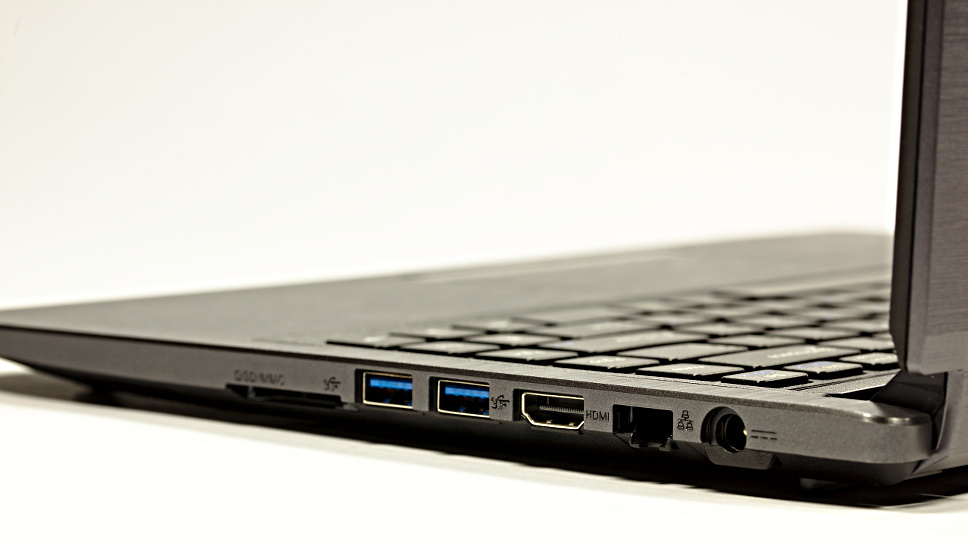
Card slot, USB 3.0 ports, HDMI, ethernet and power jack
Left-hand side of the device with audio jacks on show


Pricing starts at $899 for the base model specification. This gets you:
  • Intel i5-4200U @ 1.5Ghz (Dual core)
  • 4GB DDR3 RAM
  • Intel HD 4400 Graphics
  • 500 GB 5400 RPM HDD
  • Integrated WiFi & Bluetooth
  • 1MP Webcam
As with all System 76 computers you can craft your dream machine by bumping up specifications and adding optional extras. Options on offer for the Darter include:
  • Intel Core i5 & i7 CPUs
  • Up to 16GB DDR3 RAM
  • Dual-storage, including SSD + HDD combo
All essential ports are provided:
  • HDMI out
  • Ethernet
  • 2 x USB 3.0
  • Separate Headphone & Mic Jacks
  • SD Card Reader
For more information on the Darter Thin head over to the System 76 website where, until October 28th, you can pre-order the Darter Thin and pay just $5 for ground shipping in the US.
Read More
Posted in Laptop, Linux, TechNews | No comments

Acer C720-2848 Chromebook announced for $199

Posted on 06:13 by Unknown
Acer has released a slightly stripped down version of the previous Acer C720 Chromebook. Technically the C720-2848, the new model is still referred to as the C720 on Google and Acer’s website.

In terms of changes, there is just one. The new model comes with 2GB instead of 4GB of RAM, which has allowed Acer to drop the price down from $249 to $199 in the US.
The rest of the hardware is identical and includes the same 11.6-inch, 1366×768 resolution display, Intel fourth generation Celeron processor clocked at 1.4GHz, 16GB flash memory, dual-band 802.11 a/b/g/n Wi-Fi, Bluetooth 4.0, one USB 3.0 and 2.0 port each, HDMI out, VGA camera, and 8.5 hours of claimed battery life. It also comes with 100GB Google Drive storage and 30-day Google Play Music All Access trial.
Source
Read More
Posted in Laptop, TechNews | No comments

laptop buyer's guide: fall 2013 edition

Posted on 06:04 by Unknown
Engadget's laptop buyer's guide: fall 2013 edition
We're not sure how many of you will be lucky enough to receive a spanking new notebook for the holidays, but just in case you've got one on your list (or are shopping for someone else), we've got a newly updated laptop buyer's guide full of suggestions. Whether it's a convertible Ultrabook you're looking for, or a regular Ultrabook, or maybe a gaming machine, we're here to be of service.

Convertibles

When Windows 8 first came out, PC makers were experimenting with all sorts of inventive designs in an effort to figure out what consumers actually wanted. In those early months, we saw laptops whose screens could rotate, pop out, detach and fold over. Others had a sliding design, and one even attempted two screens. The results were mixed -- so mixed, in fact, that our last two laptop buyer's guides have had just two recommendations in the convertible category. Now that these companies have had a chance to go back to the drawing board and start shipping some 2.0 products, we're starting to see more form factors we'd actually want to use.
Dell XPS 12
DNP Engadget's laptop buyer's guide fall 2013 edition
The Dell XPS 12 has always been on this list, so you can bet we have effusive things to say now that it's been upgraded with Haswell, NFC and a larger battery (50Wh, up from 47Wh). All told, between the beefier battery and new chipset, Dell is promising this thing will last 9.5 hours on a charge -- more than three hours longer than the OG model. Otherwise, it's the same machine it always was, with a 12.5-inch, 1080p screen that flips around in its hinge so that you can show off presentations and stuff to people sitting opposite you. It might not be quite as versatile as the Yoga, but we love it anyway for its solid build quality, attractive design and unusually cushy keyboard. After all, if you can't enjoy one of these convertibles in regular notebook mode, why even bother?
The bottom line: Even if you rarely use it in tablet mode, the XPS 12 makes an excellent Ultrabook, especially now that Dell's refreshed it with Haswell and a bigger battery.
Key specs: Up to a 1.8GHz dual-core Intel Core i7-4500U CPU, 4GB to 8GB of RAM, up to 256GB of internal storage, Intel HD Graphics 4400, 12.5-inch (1,920 x 1,080) display.
Price: $1,200 and up from Dell
Lenovo IdeaPad Yoga 2 Pro
DNP Engadget's laptop buyer's guide fall 2013 edition
Even back when we included just two convertibles on this list, the Lenovo IdeaPad Yoga 13 was always one of them. Though lots of companies make missteps with their first-gen products, Lenovo won us over right away with the Yoga, whose screen could fold all the way back into tablet mode. Over time, though, as rival companies began upgrading their wares, the original Yoga started to seem stale. Well, just in the nick of time, Lenovo gave it a makeover. The new version, the Yoga 2 Pro, comes standard with a 3,200 x 1,800 screen, making it one of the crispest you'll find on a 13-inch Ultrabook. It also comes in a thinner, lighter package, and runs on Haswell processors for faster performance and longer battery life. Best of all: The price is low compared to other premium Ultrabooks. We'll be posting a review soon, so you might want to wait and see how this guy fares in real-world testing. Besides, Lenovo also has the ThinkPad Yoga, whose keyboard flattens out as you flip the screen over. That's not even on sale yet, so that's yet another reason you might want to wait.
The bottom line: The most versatile Windows convertible is back with a slimmer, lighter design, sharper screen and longer battery life.
Key specs: Up to a 1.8GHz dual-core Intel Core i7-4500U CPU, 4GB or 8GB of RAM, 128GB to 512GB of internal storage, Intel HD Graphics 4400, 13.3-inch (3,200 x 1,800) display.
Price: $1,049 and up from Lenovo
Sony VAIO Duo 13
DNP Engadget's laptop buyer's guide fall 2013 edition
Remember we said some companies made missteps their first time out? We give you Sony. The VAIO Duo 11 didn't make our original list. In fact, no slider Ultrabooks did. The propped-up display eats up too much of the potential keyboard space, we said, leading to a compromised typing experience. The Duo 11, in particular, also suffered from short battery life and an ugly hinge design that left too many of the mechanical bits exposed. Fortunately, Sony went back to the drawing board and returned with a much-improved follow-up, the VAIO Duo 13. With its "Surf Slider" hinge, the Duo is now much easier to open with one hand, and the back side has been cleaned up as well. Interestingly, though this rocks a larger 13.3-inch screen, the dimensions are about the same, and the weight is only slightly heavier. The secret? Thinner bezels to maximize screen real estate. But wait, we're not done yet: There's now a clip to hold the included pressure-sensitive pen. The keyboard, meanwhile, is more comfortable this time around, even if the touchpad is a bit cramped. And the battery life is much longer too, thanks to a fresh Haswell processor.
The bottom line: Sony got the slider design right on its second try, thanks to a completely revamped hinge, a more spacious keyboard and longer battery life.
Key specs: Up to a 1.7GHz dual-core Intel Core i7-4650U CPU, 4GB to 8GB of RAM, 128GB to 512GB of internal storage, up to Intel HD Graphics 5000, 13.3-inch (1,920 x 1,080) display.
Price: $1,400 and up from Sony

High-end notebooks

Just because every PC maker is experimenting with some strange, convertible form factor, doesn't mean regular, old notebooks are going the way of the dodo. In fact, most of the laptops we've seen this season are standard notebooks, many with touchscreens attached (at least in the case of Windows machines). In fact, with the exception of the Lenovo Yoga 2 Pro, Dell XPS 12 and Sony VAIO Duo 13, all of the high-end systems on our list actually do hew to this design. Find our favorites below.
Acer Aspire S7-392
DNP Engadget's laptop buyer's guide fall 2013 edition
If there's one theme coursing through this guide, it's that Intel's new Haswell processors have transformed laptops with poor battery life, and turned them into lean, mean, all-day machines. That couldn't be truer of the Acer Aspire S7, which came out last year to mostly rave reviews. Well, raving about everything except the runtime, which topped out at around four hours. Recently, though, Acer refreshed its 13-inch flagship Ultrabook with Intel's fourth-generation processors, and is now promising up to seven hours of juice (we got seven and a half). Aside from that very important under-the-hood change, Acer didn't alter the design much; the keyboard layout is similar, as is that white Gorilla Glass lid. Also, while the display option in the US is still a 1080p IPS panel, other markets, especially some European countries, will get the choice of a 2,560 x 1,440 screen. No fair, we say.
The bottom line: The new S7 addresses all the shortcomings of last year's model, and is now one of our favorite Ultrabooks.
Key specs: Up to a 1.8GHz dual-core Core i7-4500U CPU, 8GB of RAM, 128GB to 256GB of internal storage, Intel HD Graphics 4400, 13.3-inch (1,920 x 1,080) display.
Price: $1,400 from Acer
Apple MacBook Air
DNP Engadget's laptop buyer's guide fall 2013 edition
Apple's latest MacBook Airs look just like the ones that came out last year, but they still bring some meaningful improvements. In particular, they come complete with Haswell processors and the promise of much longer battery life (up to nine hours on the 11-inch model, and up to 12 on the 13-inch version). And remember, Apple has a tendency to make conservative battery life claims -- in fact, we got nearly 13 hours on the 13-inch model when we took it for a spin. Meanwhile, Apple also switched to faster PCIe SSDs, which yield much faster I/O speeds. On top of all that, Apple dropped the starting price of the 13-inch model by $100, making it that much easier for us to recommend. The only thing you might want to keep in mind is that the new Retina display MacBook Pro offers similar battery life and doesn't weigh that much more, so you might be tempted to get that instead if you want a sharper screen and don't mind a little extra heft.
The bottom line: No, there's still no super-sharp Retina display, but the unbelievably long battery life more than makes up for it.
Key specs: 11-inch model: up to a 1.7GHz dual-core Core i7 CPU, 4GB to 8GB of RAM, 128GB to 512GB of internal storage, Intel HD Graphics 5000, 11.6-inch (1,366 x 768) display; 13-inch model: up to a 1.7GHz dual-core Core i7 CPU, 4GB to 8GB of RAM, 128GB to 512GB of internal storage, Intel HD Graphics 5000, 13.3-inch (1,440 x 900) display.
Price: $999 and up (11-inch)/$1,099 and up (13-inch) from Apple
HP Spectre 13 Ultrabook
DNP Engadget's laptop buyer's guide fall 2013 edition
It's been a while since we've featured an HP Ultrabook in our laptop buyer's guide -- about seven months, in fact. It's an old story, really: HP took its time refreshing its line with new designs and fresh processors, and we were loath to recommend something that was about to become obsolete. Well, we're glad we waited. HP recently announced the Spectre 13 Ultrabook, and it's better than its predecessor in almost every way. In addition to running Haswell Core i5 and i7 processors, it's available with a 2,560 x 1,440 display for an extra $70 -- a first for HP. Additionally, it has an extra-wide touchpad with "Control Zones" on the sides that give you tactile feedback as you're doing things like exposing the Charms Bar or swiping in from the left to cycle through open apps.
The bottom line: The Spectre 13 remains one of the few Ultrabooks available in the US with a screen sharper than 1080p.
Key specs: Up to a 1.8GHz dual-core Core i7-4500U CPU, 4GB or 8GB of RAM, up to 256GB of internal storage, Intel HD 4400 Graphics, 13.3-inch (1,920 x 1,080 or 2,560 x 1,440) display.
Price: $1,000 and up from HP
Samsung ATIV Book 9 Plus
DNP Engadget's laptop buyer's guide fall 2013 edition
Samsung went a long time without refreshing its Series 9 Ultrabook, save for adding a 1080p screen option earlier this year. Finally, though, the company announced a proper replacement, the ATIV Book 9 Plus. Though it's similar in design to the aluminum version that came out last year, this steps up to a much sharper screen -- a 13.3-inch, 3,200 x 1,800 panel with enough pixel density to surpass even the 13-inch Retina MacBook Pro. On the inside, it makes use of Haswell processors, solid-state storage and a battery rated for 12 hours of runtime (we managed nearly nine hours in our video rundown test). The only unfortunate thing is that thanks to the added touchscreen, the ATIV Book 9 Plus is heavier than it used to be: 3.06 pounds versus 2.55. Make no mistake, it's still plenty portable; but there are even lighter touchscreen Ultrabooks out there.
The bottom line: One of our favorite Ultrabooks from 2012 gets refreshed with an eye-melting 3,200 x 1,800 display and a more robust battery.
Key specs: Up to a 1.8GHz dual-core Core i7-4500U CPU, 4GB or 8GB of RAM, up to 256GB of internal storage, Intel HD Graphics 4400, 13.3-inch (3,200 x 1,800) display.
Price: $1,400 and up from Samsung
Sony VAIO Pro 13
DNP Engadget's laptop buyer's guide fall 2013 edition
Sony broke a lot of hearts when it discontinued its super-thin, super-light Z series. Fortunately for VAIO fans, though, the company recently came out with the Pro 13, a 2.34-pound, carbon fiber machine that's the spiritual successor to the ol' Z. Sony says it's the lightest touchscreen Ultrabook of this size, which sounds about right to us: This thing feels utterly insubstantial in the hand. In addition to that featherweight design, the Pro 13 offers PCIe SSDs, a 1080p display with wide viewing angles, a backlit keyboard and built-in NFC. Battery life is rated at seven hours (thanks, Haswell!), but you can double that with an external sheet battery (another nice carryover from Sony's older machines). Most importantly, though, Sony slashed the starting price of the 13 to $1,250, down from around two grand. There's also a less-expensive 11-inch version, the Pro 11, but the keyboard is a tad cramped, and you won't get those fast PCIe SSDs (just regular solid-state drives).
The bottom line: Sony's discontinued Z series laptop gets a new life with the Pro lineup, which offers great battery life, crisp displays and a much more reasonable starting price.
Key specs: Up to a 1.8GHz dual-core Core i7-4500U CPU, 4GB to 8GB of RAM, 128GB to 512GB of internal storage, Intel HD Graphics 4400, 13.3-inch (1,920 x 1,080) display.
Price: $1,250 and up from Sony

Mid-range

Acer M5-583P-6428
DNP Engadget's laptop buyer's guide fall 2013 edition
OK, it's technically not the cheapest Haswell system Acer has to offer (that would be the $580 E1-572-6870), but it is the cheapest one that comes with both a fourth-generation Core processor and a touchscreen. Be warned that Acer had to cut corners in some areas to make that price point; the build quality is fairly mediocre, and you'll have to make do with a spinning hard drive. That said, we appreciated the narrow bezels on last year's M5, and we have a feeling the battery life will be more impressive this time around too.
The bottom line: Acer's cheapest Haswell laptop with a touchscreen offers decent specs for the price.
Key specs: 1.6GHz dual-core Core i5-4200U CPU, 8GB of RAM, 500GB of internal storage, Intel HD 4400 Graphics, 15.6-inch (1,366 x 768) display.
Price: $700 from Best Buy
HP Envy TouchSmart 15t-j100
DNP Engadget's laptop buyer's guide fall 2013 edition
HP's 15-inch, mid-range laptop (once called the dv6) has received a makeover for 2013, with an aluminum chassis, backlit keyboard and a touchscreen with up to 1080p resolution (1,366 x 768 is the standard). Now called the Envy TouchSmart 15, it's available with an AMD processor at the low end, and a quad-core Intel Core i7 processor at the high end. For our purposes, though, we're recommending the in-between option, a $750 model that comes with a dual-core Core i5 CPU. As a performance machine, it comes standard with speakers and a subwoofer for your audio needs, and can be configured with up to a 4GB NVIDIA GeForce GT 750M GPU.
The bottom line: A great pick for mid-range budgets, with enough flexibility that you can turn it into a performance powerhouse.
Key specs: Up to a 2.2GHz quad-core Intel Core i7-4702MQ CPU, 6GB to 16GB of RAM, up to 1TB of internal storage, up to a 4GB NVIDIA GeForce GT 750M GPU, 15.6-inch (1,366 x 768 or 1,920 x 1,080) display.
Price: $750 and up from HP
Lenovo IdeaPad U430 Touch
DNP Engadget's laptop buyer's guide fall 2013 edition
There's a reason we chose to give away the Lenovo IdeaPad U430 Touch in our back-to-school sweepstakes: It's a great thin-and-light laptop at a great price. We've actually been testing it here in our labs (review coming soon) and have found that in addition to offering a sleek, premium-looking design, it performs better than many other laptops in the same price range. It even manages to offer the same sort of battery life you'd expect from an Ultrabook, and that's despite the fact that it has a spinning hard drive instead of a more power-efficient SSD. Ready for the clincher? It has a fairly sharp 1,600 x 900 display -- not bad for a machine at this price.
The bottom line: An incredible value for a sub-$700 laptop.
Key specs: 1.6GHz dual-core Core i5-4200U CPU, 4GB of RAM, 500GB of internal storage, Intel HD 4400 Graphics, 14-inch (1,600 x 900) display.
Price: $680 from Best Buy
Toshiba Satellite P50
DNP Engadget's laptop buyer's guide fall 2013 edition
As you might have gathered looking at this list, though Intel formally announced its Haswell processors back in June, some companies have been a little slow in getting their upgraded systems to market. In fact, some mid-range machines still rock Ivy Bridge (we've since cut them off this list, which is why you won't see Sony's VAIO Fit line, for example). Not Toshiba's, though: The company recently unveiled a whole line of back-to-school systems, big and small. Of the bunch, the 15-inch P50 (that's P for "premium") hits the sweet spot for us, with a nice mix of higher-end design elements and robust performance. With this year's models, Toshiba's made the aluminum chassis up to 25 percent thinner. It's also added features like an optional touchscreen and an HDMI 1.4 port for 4K output (should you actually have some compatible content). Rounding out the list, Toshiba included Sleep and Charge/Sleep and Music ports as well as Harman Kardon speakers with DTS sound -- pretty much what we've already come to expect from Toshiba's high-end machines.
The bottom line: Toshiba's P series is as feature-rich as ever, except now it's significantly thinner.
Key specs: Up to a 2.4GHz quad-core Intel Core i7-4700MQ CPU, 12GB of RAM, up to 1TB of internal storage with an 8GB SSD, up to a 2GB NVIDIA GeForce GT 740M GPU, 15.6-inch (1,920 x 1,080) display.
Price: $700 and up from Toshiba
Budget
ASUS VivoBook X202E-DH31T
DNP Engadget's laptop buyer's guide fall 2013 edition
We can't promise this is a top performer -- in fact, with a Core i3 Ivy Bridge processor and spinning hard drive, it's almost certainly not -- but we don't know of another touchscreen laptop that costs so little. Scratch that -- our budget section has actually grown to include more touchscreen models -- but most don't have a processor this relatively powerful. In any case, so long as you can accept this isn't as fast as a $700 system, the X202E is probably your best bet if you want a cheap touchscreen Windows 8 laptop with enough oomph to be your main machine.
The bottom line: Even after all this time, we're still hard-pressed to think of another touchscreen laptop with halfway decent specs and this low a price.
Key specs: 1.8GHz dual-core Intel Core i3-3217U CPU, 4GB of RAM, 500GB of internal storage, Intel HD 4000 graphics, 11.6-inch (1,366 x 768) display.
Price: $479 from Amazon
Samsung Chromebook (2012)
DNP Engadget's laptop buyer's guide fall 2013 edition
It's taken a while, but we think we can finally start recommending Chromebooks to regular consumers. Not the Chromebook Pixel, necessarily -- that's not a practical purchase for anyone -- but the cruder, less expensive variety. Specifically, Samsung's $249 Chromebook, which got a significant price cut after Sammy moved from an Intel Celeron processor to a homegrown Exynos 5 Dual SoC, based on ARM's Cortex-A15 chip. To be sure, you may suffer a slight performance hit as a result, but this new, lower-powered chip is still hearty enough to support everything Chromebooks were built for: namely email, web surfing and video streaming. Meanwhile, the comfortable keyboard and trackpad make it a pleasure to use -- something we can't even say about many more expensive laptops. Best of all, the battery lasts six and a half hours. Sure, it's no Ultrabook, but it's pretty good for a Chromebook, which is precisely why we'd still recommend this over newer models like the $279 HP Chromebook 11 or the pricier HP Chromebook 14, which has Haswell.
The bottom line: With more bang for your buck than any other Chromebook, Samsung's offering is great if all you want is a cheap secondary laptop and would have spent all your time in the browser anyway.
Key specs: 1.7GHz dual-core Samsung Exynos 5 Dual (5250), 2GB of RAM, 16GB of internal storage, integrated graphics, 11-inch (1,366 x 768) display.
Price: $243 from Amazon
Dell Inspiron 15R
DNP Engadget's laptop buyer's guide fall 2013 edition
Dell's long had a stronghold in the cheap laptop market, and if you're just starting to look for a new notebook now, your timing couldn't be better: The company recently refreshed its mainstream Inspiron 15R with Haswell processors. The specs for the 15-incher offer some nice variety (up to a Core i7 processor with 8GB of RAM and 1TB of storage), and we also dig the slimmed-down chassis, which takes design cues from Dell's higher-end systems. And if the screen size isn't quite right, there are also 14- and 17-inch versions for you to consider. As a heads-up, the 14- and 15-inch models can be configured with touchscreens, but the 17-incher is non-touch-only. On the other hand, the 17R has 1,600 x 900 resolution, whereas 1,366 x 768 is standard on the two smaller machines.
The bottom line: If you're looking for an affordable mainstream laptop, you'll want to take a look at Dell's recently revamped Inspiron R line with its wide offering of configurations and optional touchscreens.
Key specs: Up to a 1.8GHz dual-core Intel Core i7-4500U CPU, 6GB to 16GB of RAM, up to 1TB of internal storage, Intel HD 4400 graphics, 15.6-inch (1,366 x 768) display, optional touchscreen.
Price: $600 and up from Dell

Performance powerhouses

Sometimes an Ultrabook just isn't good enough. Maybe you want discrete graphics for editing photos or chopping HD video. Maybe you're looking for a little more processing power, better speakers or -- gasp! -- an optical drive for burning the occasional Blu-ray. Whatever it is, we've got the selection narrowed down to three. (No promises on the BD-RW drive, though.)
Apple MacBook Pro with Retina display
DNP Engadget's laptop buyer's guide fall 2013 edition
We've always liked Apple's Retina display MacBook Pros, but we could never recommend them without a caveat: They were good (really good), but only if you could afford them. This year, it's a little easier to suggest them -- especially the 13-inch model, which has seen a $400 price drop (the 15-incher is cheaper too, but only by $200). The 13-incher in particular is now closer than ever to the 13-inch MacBook Air in both weight and thickness, with just half a pound between them. And thanks to a new Haswell processor too, the battery life is also fairly similar; we got over 11 hours of runtime in our battery rundown test, compared with nearly 13 for the Air. All told, you'll be faced with a difficult choice: Buy the MacBook Pro for its stronger graphics or get the Air for its lighter weight and slightly longer battery life? It all depends on your priorities.
The bottom line: Apple's Retina display MacBook Pros are easier to recommend now that the prices have dropped, and now that the battery life has taken a huge leap.
Key specs: 13-inch: Up to a 2.8GHz dual-core Core i7 processor, 4GB to 16GB of RAM, up to 1TB of internal storage, Intel Iris graphics, 13.3-inch (2,560 x 1,600) display; 15-inch: Up to a 2.6GHz quad-core Core i7 CPU, 8GB to 16GB of RAM, up to 1TB of internal storage, Intel Iris Pro graphics or a 2GB NVIDIA GeForce GT 750M GPU, 15.4-inch (2,880 x 1,800) display.
Price: $1,299 and up (13-inch)/$1,999 and up (15-inch) from Apple
Dell XPS 15
DNP Engadget's laptop buyer's guide fall 2013 edition
The Dell XPS 15 fell off our shortlist for the summer buyer's guide just because it was getting long in the tooth and hadn't yet been updated with Haswell. Since, then, though Dell has come out with a redesigned model, complete with fourth-generation Intel processors and a 3,200 x 1,800 screen option. So with that, it's returned to our laptop buyer's guide with a vengeance. If you check out Dell's site, you'll see it's available in two configurations, with the higher-end $1,999 model matching the 15-inch Retina display MacBook Pro spec-for-spec in nearly every case (weight, screen quality, graphics, et cetera).
The bottom line: Windows users who always wanted a machine as light and powerful as the Retina display MacBook Pro with just as sharp a screen now have a solid option in the new Dell XPS 15.
Key specs: Up to a 2.2GHz quad-core Core i7-4702HQ CPU, 8GB or 16GB of RAM, up to 1TB of internal storage with a 32GB SSD, Intel HD 4400 graphics or a 2GB NVIDIA GeForce GT 750M GPU, 15.6-inch (1,920 x 1,080 or 3,200 x 1,800) display.
Price: $1,500 and up from Dell
Lenovo IdeaPad Y510p
DNP Engadget's laptop buyer's guide fall 2013 edition
When the IdeaPad Y510p came out, Lenovo was quick to clarify it's not a gaming laptop, per se. Instead, the company would rather you think of it as more of an all-around multimedia machine, the sort of thing you'd use to edit full HD video or batch-edit lots of photos. And while we would indeed recommend this to anyone planning on doing serious editing, we'd also suggest gamers take a look: The system comes standard with a 2GB NVIDIA GeForce GT 750M GPU, and almost every configuration sold has a 1080p display to match. Even design-wise, it straddles the line: The red backlit keyboard suggests this is a gamer's machine, regardless of what Lenovo says, but thanks to an otherwise simple chassis, it's still restrained enough that you can use it in public.
The bottom line: Powerful enough for a gamer, but discreet-looking enough for everybody else.
Key specs: Up to a 2.4GHz quad-core Intel Core i7-4700MQ CPU, 8GB to 16GB of RAM, 1TB of internal storage with an optional 24GB SSD, up to a 2GB NVIDIA GeForce GT 755M GPU with optional Ultrabay SLI graphics, 15.6-inch (1,366 x 786 or 1,920 x 1,080) display.
Price: $1,099 and up from Lenovo

Gaming systems

We know what you're going to say, dear readers: Gaming laptops are overpriced, and it's better to just build your own desktop anyway. We don't necessarily disagree. If, however, you don't mind paying a premium, they're a good way to enjoy still-playable frame rates, even while on the go.
Razer Blade (2013)
DNP Engadget's laptop buyer's guide fall 2013 edition
After wowing us with its 17-inch, absurdly thin Razer Blade laptop, Razer is back with a 14-inch model (yep, also called the Razer Blade). Like its big brother, now called the Razer Blade Pro, it costs a pretty penny, with a starting price of $1,800. As before, then, you're not getting the best bang for your buck, but if you insist on a lightweight form factor and strong performance and can only really compromise on price, this could be the thing for you. What's interesting is that Razer got rid of its Switchblade UI -- that secondary LCD that doubled as a touchpad -- a move that allowed the company to achieve the smaller, thinner laptop we have here. All told, rock-solid build quality, fast performance and surprisingly long battery life make it a good pick for on-the-go gamers, but for the money, we wish it had a higher-res screen.
The bottom line: Razer expanded its gaming lineup to include a smaller, 14-inch model. It's as thin and powerful as you'd expect, but it's about as expensive too.
Key specs: 2.2GHz quad-core Intel Core i7-4702HQ CPU, 8GB of RAM, 128GB to 512GB of internal storage, Intel HD Graphics 4600/2GB NVIDIA GeForce GTX 765M GPU, 14-inch (1,600 x 900) display.
Price: $1,800 and up from Razer
Alienware 17
DNP Engadget's laptop buyer's guide fall 2013 edition
After years of just simple CPU refreshes, Dell finally unveiled an entirely redesigned line of gaming notebooks, with screen sizes ranging from 14 to 18 inches. For the purposes of this guide, we're focusing on the in-between-sized one, the Alienware 17, but really, we'd recommend any of them, with the caveat that the specs (especially screen quality) improve as you go up in size. Whichever you choose, Dell has retired the old plastic chassis and switched to a metal one, replete with a magnesium lid and aluminum body. These new systems also have even more customizable LED lights than before: Not only are there multiple keyboard zones, but the touchpad also fully lights up, and you can change the color of that glowing alien head on the lid. Rounding out the design changes, Dell gave the keyboard more depth, moved the vents to the back edge where they're not in the way and introduced Klipsch speakers across the board.
The bottom line: The biggest name in gaming laptops recently came out with a line of brand-new models. If you trust the Alienware brand, this couldn't be a better time to take a look.
Key specs: Up to a 3GHz quad-core Intel Core i7-4930MX CPU, 8GB to 32GB of RAM, up to 1.5TB of internal storage, up to a 4GB NVIDIA GeForce GTX 780M GPU, 17.3-inch (1,600 x 900 or 1,920 x 1,080) display.
Price: $1,499 and up from Dell
MSI GT70
DNP Engadget's laptop buyer's guide fall 2013 edition
The 17-inch MSI GT70 excels where you'd expect it to (graphics performance), and also in some areas you wouldn't -- namely, battery life. Even with last year's chips, it lasts nearly three hours on a charge, but with a new Haswell processor, you can expect runtime in the four-and-a-half-hour range. Performance aside, it also has an exceptional keyboard: sturdy, tactile and loaded up with customizable backlights. The one thing you should keep in mind is that the benefit of having a 1,920 x 1,080 display is mitigated somewhat by the fact that the viewing angles are so narrow. Oh, and if you want something smaller, MSI is now selling the 14-inch GE40; it's reasonably priced, at $1,300, but it's not as configurable as, say, the Alienware 14.
The bottom line: Strong performance, a great keyboard and long battery life (for a gaming machine, anyway) make this worth considering.
Key specs: 2.4GHz quad-core Intel Core i7-4700MQ CPU, 8GB to 32GB of RAM, up to 1TB of internal storage or up to three 128GB SSDs, up to a 4GB NVIDIA GeForce GTX 780M GPU, 17.3-inch (1,920 x 1,080) display.
Price: $1,500 and up from MSI
ASUS G750
DNP Engadget's laptop buyer's guide fall 2013 edition
If you're looking for a Haswell-powered gaming notebook, we'd advise you not to count out ASUS and its Republic of Gamers line. Its refreshed 17-inch G750 laptop, available in two configurations, packs a 2.4GHz quad-core processor similar to what you'll find on competing models, like the MSI GT70 detailed above. For the money, though, it starts with more RAM, and has a lovely design defined by brushed-metal surfaces. Additionally, ASUS has added an amplifier inside the headphone socket, so you should expect better in-game audio with this generation.
The bottom line: ASUS' 17-inch gaming machine is back with a new processor, fresh graphics and improved audio quality -- something the notebook wasn't known for in previous generations.
Key specs: 2.4GHz quad-core Intel Core i7-4700HQ CPU, 12GB to 32GB of RAM, up to 1TB of internal storage with an optional 512GB SSD, up to a 4GB NVIDIA GTX 780M GPU, 17.3-inch (1,600 x 900 or 1,920 x 1,080) display.
Price: $1,283 and up from Amazon 

Source: Engadget
Read More
Posted in Laptop | No comments
Older Posts Home
Subscribe to: Posts (Atom)

Popular Posts

  • Call of Duty: Ghosts Review
    Developer: Infinity Ward Publisher: Activision Platforms: PC, X360, PS3, PS4, Xbox One Price: £39.99 Reviewing a Call of Duty game is a ...
  • ‘Strata’ for iOS and Android game review
    There are games that are fun. There are games that look great. And then there are games that do both. Strata is one such game that h...
  • Review: Seagate 600 480GB SSD
    Seagate Joins the Fray It’s been quite an interesting turn of events over the past couple years in the storage industry. Whereas practical...
  • Xbox One vs. PS4: How They Stack Up Today
    Two new gaming consoles. Both very powerful. Both very ambitious. Both about to meet head to head... and do battle for your time, money an...
  • iBuypower Chimera 4SE FX Ultimate: AMD Gaming PC
    iBuypower is offering an AMD-based system in its Chimera 4SE line, which is designed to give users serious gaming performance without a wa...
  • The Last Days of the DSLR
    The DLSR is everywhere. You see it around the necks of tourists, against the faces of pro photographers. Since Canon introduced the Digita...
  • Buying Guide: Find the best headphones
    If you’re looking to get more audio enjoyment from your smartphone, tablet, media player, or computer, new headphones will do wonders. And ...
  • CCBoot - LAN Boot Software for Windows
    LAN Boot Solution Background LAN boot is a technology based on IP (Internet Protocol), UDP (User Datagram Protocol), DHCP (Dynamic ...
  • Adobe Photoshop CS6 Extended 13.0 & Plugins + Textures
    Adobe Photoshop CS6 Extended 13.0 & Plugins + Textures | 3.5 GB Adobe Photoshop CS6 Extended software delivers even more imaging magi...
  • Sony Vaio Tap 11 Review
    Introduction Sony's engineering chops are really showing this year, across its phones, tablets and convertibles portfolio. The Vaio Tap ...

Categories

  • Android
  • Apple
  • Audio
  • Blogger
  • C/C++
  • Cabling
  • Cameras
  • Cases
  • CISCO
  • Cooling
  • CPU
  • Desktop
  • DNS
  • Ebook
  • Fiber Optic
  • Gadgets
  • Game
  • Google
  • Graphic Card
  • Hardware
  • HDD
  • HTC
  • HTMLCSS
  • Hyper-V
  • Intel
  • iOS
  • iPad
  • Iphone
  • IT
  • jQuery
  • Laptop
  • Linux
  • Mac
  • MacTut
  • Microsoft
  • Mobile
  • Mouse
  • Networking
  • News
  • Nexus
  • Nokia
  • Nvidia
  • OS
  • PERIPHERALS & COMPONENTS
  • Photoshop
  • Printers
  • Programming
  • Projectors
  • PS4
  • Ram
  • RedHat
  • Review
  • Samsung
  • Scanners
  • Seagate
  • Security
  • Server2008
  • Server2012
  • Servers
  • Smartphone
  • Software
  • Sony
  • Storage
  • Tablets
  • TechNews
  • Template
  • Tutorials
  • TV
  • Ubuntu
  • Voip
  • Webdesign
  • Webiste
  • WebServer
  • Win7
  • Win8
  • Windows Phone
  • Wordpress
  • Workstation
  • XBOX

Blog Archive

  • ▼  2013 (495)
    • ▼  December (35)
      • Smart Power Strip now works with SmartThings WiFi ...
      • The Last Days of the DSLR
      • Nokia Lumia 2520 has arrived, check out our hands-on
      • 2 Million Gmail, Facebook and Twitter Accounts Rep...
      • Fleksy predictive keyboard for Android exits beta,...
      • iPhone Anamorphic Lens Lets You Shoot Wider Than W...
      • Nokia Wins Ban on HTC One Mini in U.K.
      • Finally, USB 3.1 Will Feature Reversible Connectors
      • MSI Launches Small But Mighty Z87I Gaming AC and G...
      • Samsung Galaxy S5 benchmark reveals 2K screen
      • NVIDIA Fan in Bejing Builds a 6ft Replica GeForce ...
      • Are dual-booting phones the future of Android?
      • How to Block Websites in Windows 7/8 in Chrome and...
      • How to Control your Android Mobile from PC or Laptop
      • Resize Image without loosing Quality
      • AllCast for Android pushes media to Apple TV and R...
      • Alcatel Idol X+ to launch with smartwatch and smar...
      • The legend of the HTC HD2 continues; aged device r...
      • Amazon Prime Air drones revealed on 60 Minutes, ai...
      • Samsung to create 20 MP camera sensor for future f...
      • Oppo's swiveling N1 smartphone to be available wor...
      • FileMaker Pro 13 Prematurely Appears on Apple's On...
      • Sony Vaio Tap 11 Review
      • Dell preparing to squeeze 4K resolution onto a 24-...
      • Microsoft releases VideoLoops: A GIF creator tool ...
      • Pebble Smartwatch for Android and iOS Hit Amazon f...
      • 3D Printing Market Forecasted For Explosive Growth...
      • ASUS Transformer Book T100 review: a Windows table...
      • Xbox One's 500GB HDD swapped for bigger, faster dr...
      • U.S. Army Saved $130 Million by Stealing Software
      • Xbox One Scores Big on Black Friday Surpassing PS4...
      • Buying Guide: Find the best headphones
      • Sailfish OS will be available for Android users to...
      • Amazon Cyber Monday Is The Real Deal
      • Nvidia Calls PC "Far Superior" to Video Game Consoles
    • ►  November (332)
    • ►  October (12)
    • ►  September (27)
    • ►  August (2)
    • ►  July (10)
    • ►  June (42)
    • ►  May (35)
Powered by Blogger.

About Me

Unknown
View my complete profile