albtechportal

  • Subscribe to our RSS feed.
  • Twitter
  • StumbleUpon
  • Reddit
  • Facebook
  • Digg

Wednesday, 4 December 2013

NVIDIA Fan in Bejing Builds a 6ft Replica GeForce GTX 690 Using Over 11,000 Legos

Posted on 12:38 by Unknown
There are many things you could build with 11,396 Lego pieces, but for Xiaosheng Li, a 23-year-old freelance writer for Chinese websites and an avid NVIDIA fan, there was only one thing on his mind. He wanted to build a replica GeForce GTX 690 graphics card, so in July he created a digital mockup using Lego modeling software. Three months later, he had accomplished his goal.

According to NVIDIA, the 23-year-old writer came up with the idea after seeing a "crude model of a competing company's graphics card" that also used Legos. Being an NVIDIA fan, he wanted to make a better looking model. It appears he succeeded, having built a realistic looking replica that measures almost 6 feet long, more than two feet wide, and has a working fan.


GeForce GTX 690 Lego

"I think I have already qualified to become history’s most powerful Nfan," Li wrote in Chinese-language forum post.

GeForce  GTX 690 Lego

Since constructing the giant size replica, which by the way is built to scale, Li has been able to visit NVIDA's headquarters in Santa Clara, California and meet the company's CEO, Jen-Hsun Huang, who gave him an autograph.

Via: NVIDIA | News Archive | 
Read More
Posted in Graphic Card, Hardware, Nvidia, TechNews | No comments

Are dual-booting phones the future of Android?

Posted on 05:38 by Unknown
Sailfish
Let’s face it, Android isn’t perfect. It has issues, it has flaws. And sometimes, you just get the urge to change the software that you’re running. The beauty of Android is that you can do that. You can do everything from a simple launcher tweak to a full-blown ROM change. Now, it’s becoming possible to even change the operating system you’re running on.
We first saw this with the ASUS Transformer Book Trio, which ran both Android and Windows 8. On the go, you had an Android and light Windows tablet. But when you plugged it into its keyboard dock, it really came to life with a full blown Intel Core i7 processor, expanded hard drive and larger battery, which turned it into a fully fledged Windows 8 laptop. A unique device, to say the least.
Unfortunately, the Transformer Book Trio was a niche device that never really blossomed. It was struck with a high price that effectively killed the deal for many potential buyers. But the execution of the Transformer Book Trio isn’t the only way to release a dual-OS device.
Just in the last couple of days, we’ve seen the CEO of Jolla, creator of Sailfish OS, come out and say that Jolla is working to allow Sailfish to run on Android hardware. Within just a couple of months, you could run an entirely new operating system on your existing Android device. No need to go out and buy a new high-priced device, just simply do a little bit of work and get it right there on your Android phone. Can we get a round of applause for Jolla for working to make this reality?
I’ll be completely honest; I think Sailfish looks quite nice. And since it’s compatible with Android apps, I’d be perfectly happy with, at the very least, trying it. If it’s as simple as flashing a new ROM onto my phone, I would be entirely up for using it. The UI looks beautiful, and I’m leaning towards optimism that apps designed for Sailfish will look just as nice.
Now here’s a thought. What if we didn’t need to flash it onto our Android phones? What if our phones came pre-installed with Android and Sailfish? Dual-booting Android and Sailfish phones? It’s entirely possible. Both operating systems are rooted in Linux, and because we can flash Sailfish onto Android phones, they must be able to run on the same hardware. With full Android app compatibility, the idea of a phone running both Sailfish and Android sounds quite appealing.
Dual-booting phones could, in fact, be the future of Android. When you press the power button on your phone to boot it up, you could simply have an option asking which OS you wanted to boot into. Let’s be honest, a lot of us certainly wouldn’t say no to that. If you’re really a die-hard Android fan then you can simply boot into Android and run your favorite li’l OS. But if you prefer to shake things up a bit, then you could boot into a different OS such as Sailfish, or even something like Ubuntu for Mobile. Any of the other open source operating systems that also have a Linux core could easily be an option for dual-booting phones


Source
Read More
Posted in Android, TechNews | No comments

Monday, 2 December 2013

How to Block Websites in Windows 7/8 in Chrome and Firefox Easily

Posted on 03:36 by Unknown
Internet is just like a coin, it has both sides one side for Good things and other side is for bad things.These bad things are highly dangerous to Children,As Children are spending most of their time on Internet they are more prone to Bad things, Here are some ways where you can protect your children from potentially bad things on Internet i.e you can block unwanted and harmful sites on your PC and restrict internet.


block+any+website+easily

Must Check: How to Open Blocked Websites

Step By Step Procedure to Block a Website

Open DNS:
This is a simple way to block adult content and other harmful content on Internet from your children. Open DNS blocks harmful content automatically on your computer.When any one from your computer try to access the harmful sites.
This is a simple way for NON Techie Parents, You can configure Open DNS in simple four steps.check them below

Step 1: 

Open Network and Sharing Center and click on Active Connections (From Control panel or by clicking on Network icon from taskbar )
Network+and+Sharing+Center_2

Step 2: 

Click on Adapter Settings, Now select your active network connection device. And Right click on active connection and hit on Properties to open the network device properties.
(Here in our case it Local Area connection)
Network+Connectionsp

Step 3:

Now select the Internet Protocol version 4 and hit on Properties

Local+Area+Connection+Properties

Step 4:

  • Now change the option from "Obtain DNS server address automatically" to "Use the following DNS server addresses"
  • Now enter the following DNS server address "208.67.222.123" and "208.67.230.123"
  • Save the settings and reconnect to Internet, Now try to open any harmful website from your browser, to check weather it is blocking or not.
last+shot
Must Check: 10 tips to make PC work Faster

How to Block specific sites on your computer:

Do you want to Block some specific websites on your computer, then you should continue reading this..!!
  • Open your "hosts" with notepad which is located Here "c:\WINDOWS\system32\drivers\etc\" and don't forget to open this file with Administrator privileges.
  • After opening the host file with "Notepad". Goto last line of the file and add the websites to be blocked on your computer in this format
127.0.0.1 yahoo.com 
127.0.0.1 facebook.com 
127.0.0.1 twitter.com  

block+sites
  • After adding these lines, you can replace the website address with the specific website address that you want to block on your computer, and save the file.
  • After saving reconnect Internet to take effect in changes, when anyone try to open the blocked website on your computer they will get "Problem loading page" error.
facebook+problem+loading
  • And better to create a new user account on your computer with "Standard Account" type, so that members on your computer will not get in any way Administrator rights.
Source
Read More
Posted in Security, Tutorials | No comments

How to Control your Android Mobile from PC or Laptop

Posted on 03:30 by Unknown
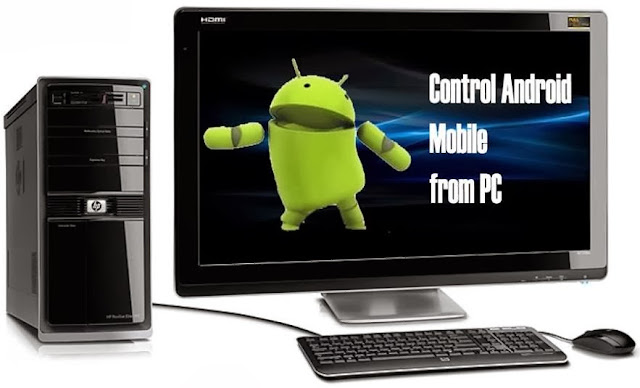
control+android+mobile+from+pc
To Control  Mobile from PC there are many apps available, but not all apps are best here we listed best app to make your work easier.

1.Airdroid for Android:

This is best Android app to transfer files from PC to Mobile for free.If you are ever tried sharing apps and file using Bluetooth and USB cable.

airdroid
Must Check: Control PC with your Mobile
Advantages and Features:
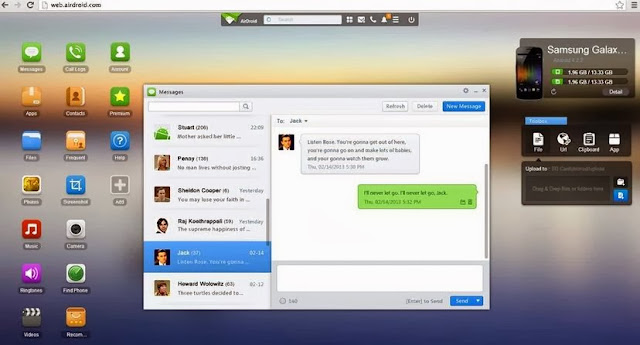
  • Send and Receive SMS from PC.You can also directly talk from PC.
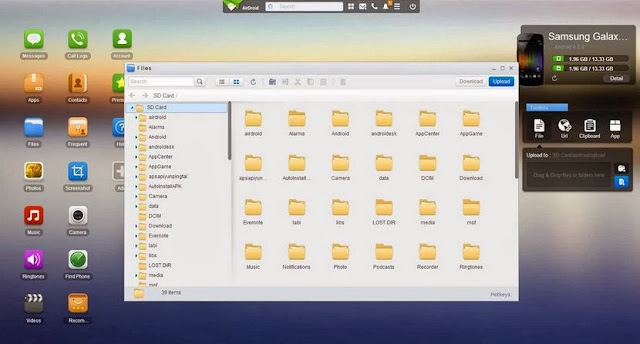
  • Transfer files,apps,photos,videos from PC to mobile wireless
  • Install/Uninstall apps easily and flexibility to take complete back up of your device.
  • Trace your device when you lost it and much more..!!
Must Check: Download S4 and Kitakt 4.4 launcher on your Mobile

Step by Step Process to use Airdroid:

  • Download Airdroid on your device.
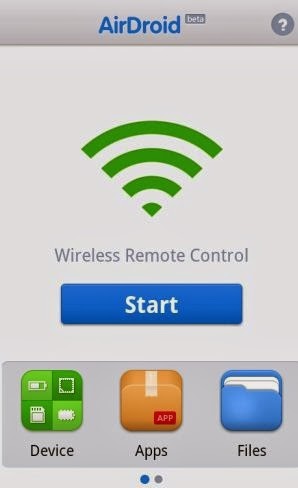
  • Now Install and Open app then Click on Start icon.
install+airdroid
  • Now note down the web address after clicking start icon.
copy+webaddress
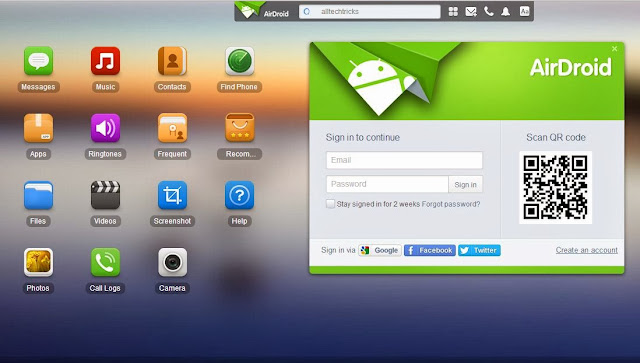
  • Now from PC browser go to web.airdroid.com or in Enter the Web address you copied in previous step.
Note: Make Sure that your device and PC is connected to same Network
open+in+pc
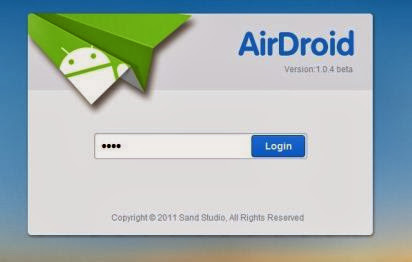
  • If you are going for web.android.com then you need to verify your device by scanning QR code or by entering password.
enter+password
  • Now you have successfully connected your android device to PC.You can start upload files by clicking files logo on desktop,you can chat from your PC and can have full access to your android phone or Tablet.
whatsapp+conversation+from+pcupload+and+delete+files
  • That's it Guys ! there are many features avalible once go through all of them and enjoy.

Here is Quick Video


Source
Read More
Posted in Android, Laptop, Mobile, Tutorials | No comments

Resize Image without loosing Quality

Posted on 03:27 by Unknown
People hate to visit websites which require more time for loading. So one should always seek to improve the webpage load time, so to do so you have to look at many things like loading sources, page cache, media files etc. One among such media file is images, adding beauty to your page, but at the same time, it is regarded as the most bulky resources which takes much time to load on the page, thereby causing inconvenience to the visitors.
But one can improve the page load time by cutting the size of an image to a significant amount. But even resizing the image without any proper knowledge may be troublesome as you may lose the quality it had. Though photoshop provides a nice feature to save the original quality of the pic, it is not preferred much as it’s too expensive to purchase the photoshop application for desktop or web version. So here I’m going to provide you with free online tools to Resize Image without loosing Quality

Web Based Tools to Resize Image without loosing Quality


1.Kraken.io :

JPEG, PNG, GIF, SIV are some of the image formats that can be compressed with this online application. This reduces the image to a quite considerable point without losing the image size.
This application is also available in Chrome and Firefox extensions

2.Imageoptimizer.net:

After uploading the image from your computer, give the size of the image and quality you wish to have after processing. This provides only some control of the output and compression ratio But Greatly Helps to Resize Image without loosing Quality.

3.Smush.it:

Smush.it is the best and popular online application you can have to compress images. It is present with an up-loader as well as URL box to have the image. In this you will not be provided with the ‘enter’ option to enter the image quality as that of previous one because it automatically optimizes the image by compressing it to a limit.

4.Compressjpg.com & Compresspng.com :

I would suggest you to have these application, for more control of the image quality. A slider appears as soon as you upload an image to auto control the quality of the last image. A preview panel is provided for showcasing the changes according to the quality slider change. So before downloading the image you can have the review of your final image. This application is available on different domains for JPG and PNG images.

5.Punypng.com :

This application is available to compress the PNG files. Upload an image and you can get a compressed size of the image. Besides this, tinypng.com , a quick tool to compress the PNG images to the best level without affecting the image quality.

Desktop tool to Resize Image without loosing Quality


If you need a Desktop tool to do this task then i would suggest you to have PNG Gauntlet as your first choice, You will need .Microsoft Net Framework 4.0 to run this tool on your Windows.
Resize Image without loosing Quality
You won’t Face any difficulty in Using this tool as it is very User Friendly. While Optimizing the images PNG Gauntlet will show you older size and Optimized size of the image. this Program is not that Fastest at it work but Usefull.


Source
Read More
Posted in Tutorials | No comments

AllCast for Android pushes media to Apple TV and Roku, available for willing beta testers (video)

Posted on 03:06 by Unknown

If you've been eager to send cloud or locally-stored media to your TV, another option could be on the way. Currently in beta, AllCast is an Android app that streams content from places like Google Drive, Dropbox or your mobile device's storage to an Apple TV, Roku, Xbox console, Samsung Smart TV and other DLNA-compatible hardware. ClockworkMod dev Koushik Dutta is behind the wheel here, however there's currently no support for Chromecast -- something we hope he'll be allowed to restore once the device's Cast SDK is released. In order to test drive this latest version of the software, you'll need to join the ClockworkMod beta testers group before nabbing the download from the Play Store (no rooting required). Need further convincing before opting in? Head down past the break for a video demo.

Via: Android Police
Read More
Posted in Android, Apple, TechNews | No comments

Alcatel Idol X+ to launch with smartwatch and smart bracelet?

Posted on 03:05 by Unknown
Alcatel Idol X+ to launch with smartwatch and smart bracelet?On Thursday, we told you some more information about the TCL/Alcatel Idol X+, which is going to be powered by the true octa-core MT6592 CPU. That chip allows all eight cores to be active at the same time. The rest of the specs belonging to the Idol X+ are top-shelf, including the 5 inch screen with 1080 x 1920 resolution, 2GB of RAM and a 13MP rear-facing snapper. 

It also appears that TCL/Alcatel has some other interesting products that will be released at the same time as the Idol X+. A published report out of China includes a picture showing a smartphone alongside what appears to be a smartwatch and a smart bracelet. The image also shows a cryptic formula
reading "1+1>2?" We don't know what the capabilities will be for the watch or the bracelet, but at the very least we would imagine that they will be able to notify the user to phone calls or messages coming in to the Idol X+.

While TCL licenses the Alcatel name, we expect the phone and accessories to be branded TCL in China and Alcatel elsewhere in the world where the products will be offered. The prior model, the Alcatel One Touch Idol X, was priced at $350 lock, stock and barrel so the Idol X+ could turn out to be a very affordable package.

It looks like a smartwatch and smart bracelet will arrive with the Alcatel Idol X+

source: MTKSJ (translated) via UnwiredView
Read More
Posted in TechNews | No comments
Newer Posts Older Posts Home
Subscribe to: Posts (Atom)

Popular Posts

  • Call of Duty: Ghosts Review
    Developer: Infinity Ward Publisher: Activision Platforms: PC, X360, PS3, PS4, Xbox One Price: £39.99 Reviewing a Call of Duty game is a ...
  • ‘Strata’ for iOS and Android game review
    There are games that are fun. There are games that look great. And then there are games that do both. Strata is one such game that h...
  • iBuypower Chimera 4SE FX Ultimate: AMD Gaming PC
    iBuypower is offering an AMD-based system in its Chimera 4SE line, which is designed to give users serious gaming performance without a wa...
  • Review: Seagate 600 480GB SSD
    Seagate Joins the Fray It’s been quite an interesting turn of events over the past couple years in the storage industry. Whereas practical...
  • Xbox One vs. PS4: How They Stack Up Today
    Two new gaming consoles. Both very powerful. Both very ambitious. Both about to meet head to head... and do battle for your time, money an...
  • The Last Days of the DSLR
    The DLSR is everywhere. You see it around the necks of tourists, against the faces of pro photographers. Since Canon introduced the Digita...
  • Buying Guide: Find the best headphones
    If you’re looking to get more audio enjoyment from your smartphone, tablet, media player, or computer, new headphones will do wonders. And ...
  • Sony Vaio Tap 11 Review
    Introduction Sony's engineering chops are really showing this year, across its phones, tablets and convertibles portfolio. The Vaio Tap ...
  • Adobe Photoshop CS6 Extended 13.0 & Plugins + Textures
    Adobe Photoshop CS6 Extended 13.0 & Plugins + Textures | 3.5 GB Adobe Photoshop CS6 Extended software delivers even more imaging magi...
  • CCBoot - LAN Boot Software for Windows
    LAN Boot Solution Background LAN boot is a technology based on IP (Internet Protocol), UDP (User Datagram Protocol), DHCP (Dynamic ...

Categories

  • Android
  • Apple
  • Audio
  • Blogger
  • C/C++
  • Cabling
  • Cameras
  • Cases
  • CISCO
  • Cooling
  • CPU
  • Desktop
  • DNS
  • Ebook
  • Fiber Optic
  • Gadgets
  • Game
  • Google
  • Graphic Card
  • Hardware
  • HDD
  • HTC
  • HTMLCSS
  • Hyper-V
  • Intel
  • iOS
  • iPad
  • Iphone
  • IT
  • jQuery
  • Laptop
  • Linux
  • Mac
  • MacTut
  • Microsoft
  • Mobile
  • Mouse
  • Networking
  • News
  • Nexus
  • Nokia
  • Nvidia
  • OS
  • PERIPHERALS & COMPONENTS
  • Photoshop
  • Printers
  • Programming
  • Projectors
  • PS4
  • Ram
  • RedHat
  • Review
  • Samsung
  • Scanners
  • Seagate
  • Security
  • Server2008
  • Server2012
  • Servers
  • Smartphone
  • Software
  • Sony
  • Storage
  • Tablets
  • TechNews
  • Template
  • Tutorials
  • TV
  • Ubuntu
  • Voip
  • Webdesign
  • Webiste
  • WebServer
  • Win7
  • Win8
  • Windows Phone
  • Wordpress
  • Workstation
  • XBOX

Blog Archive

  • ▼  2013 (495)
    • ▼  December (35)
      • Smart Power Strip now works with SmartThings WiFi ...
      • The Last Days of the DSLR
      • Nokia Lumia 2520 has arrived, check out our hands-on
      • 2 Million Gmail, Facebook and Twitter Accounts Rep...
      • Fleksy predictive keyboard for Android exits beta,...
      • iPhone Anamorphic Lens Lets You Shoot Wider Than W...
      • Nokia Wins Ban on HTC One Mini in U.K.
      • Finally, USB 3.1 Will Feature Reversible Connectors
      • MSI Launches Small But Mighty Z87I Gaming AC and G...
      • Samsung Galaxy S5 benchmark reveals 2K screen
      • NVIDIA Fan in Bejing Builds a 6ft Replica GeForce ...
      • Are dual-booting phones the future of Android?
      • How to Block Websites in Windows 7/8 in Chrome and...
      • How to Control your Android Mobile from PC or Laptop
      • Resize Image without loosing Quality
      • AllCast for Android pushes media to Apple TV and R...
      • Alcatel Idol X+ to launch with smartwatch and smar...
      • The legend of the HTC HD2 continues; aged device r...
      • Amazon Prime Air drones revealed on 60 Minutes, ai...
      • Samsung to create 20 MP camera sensor for future f...
      • Oppo's swiveling N1 smartphone to be available wor...
      • FileMaker Pro 13 Prematurely Appears on Apple's On...
      • Sony Vaio Tap 11 Review
      • Dell preparing to squeeze 4K resolution onto a 24-...
      • Microsoft releases VideoLoops: A GIF creator tool ...
      • Pebble Smartwatch for Android and iOS Hit Amazon f...
      • 3D Printing Market Forecasted For Explosive Growth...
      • ASUS Transformer Book T100 review: a Windows table...
      • Xbox One's 500GB HDD swapped for bigger, faster dr...
      • U.S. Army Saved $130 Million by Stealing Software
      • Xbox One Scores Big on Black Friday Surpassing PS4...
      • Buying Guide: Find the best headphones
      • Sailfish OS will be available for Android users to...
      • Amazon Cyber Monday Is The Real Deal
      • Nvidia Calls PC "Far Superior" to Video Game Consoles
    • ►  November (332)
    • ►  October (12)
    • ►  September (27)
    • ►  August (2)
    • ►  July (10)
    • ►  June (42)
    • ►  May (35)
Powered by Blogger.

About Me

Unknown
View my complete profile